Off-page SEO depends on other people: reviews, mentions and links. On-page SEO is the part you fully control. This on-page SEO checklist covers every item on a single page that helps Google understand it and helps a visitor trust it enough to call you.
Use it on your home page, each service page, your location pages and your blog posts. Print it, or keep it open while you edit. Most items take only a few minutes to check.
Before you start: one page, one purpose
Every page should answer one main search. Before you touch anything, write down two things for the page you are checking:
- The focus keyword: the main phrase this page should rank for, such as "kitchen renovation in Dehradun".
- The action: what you want the visitor to do, such as call, WhatsApp or fill the enquiry form.
If you cannot write one clear keyword, the page is probably trying to do too much. Split it into separate pages. Not sure which keywords to pick? Read our guide to keyword research for small businesses first.
The on-page SEO checklist at a glance
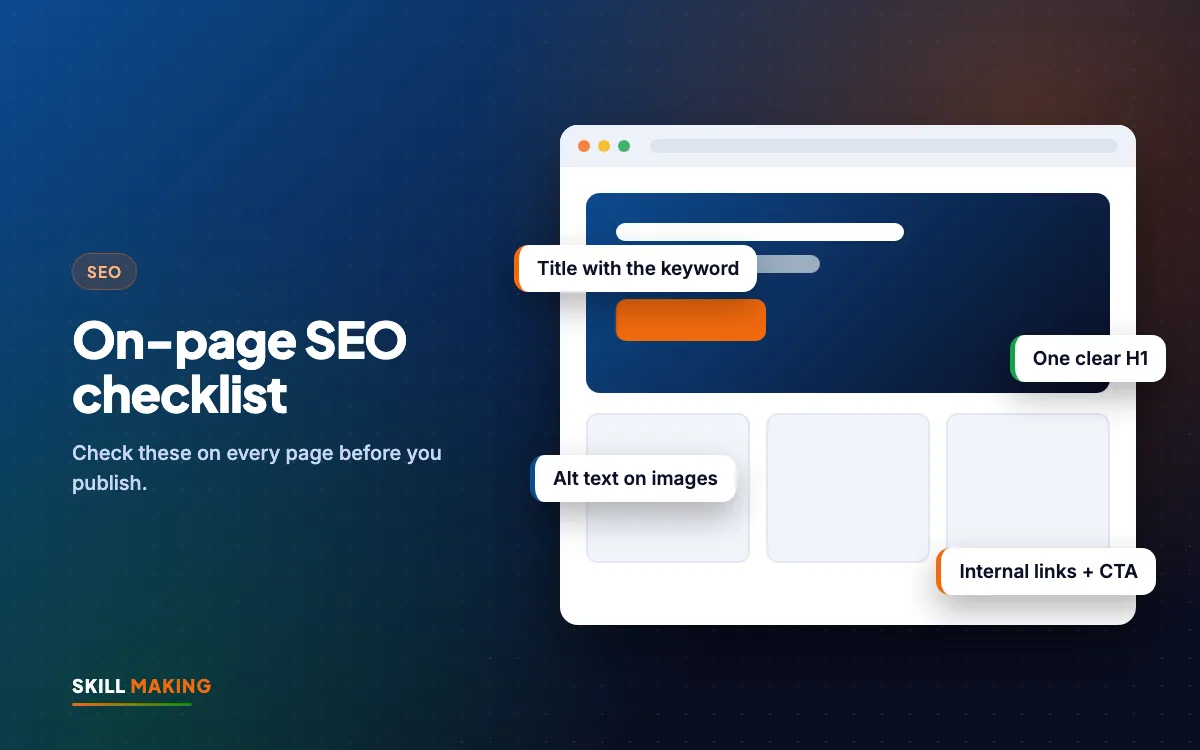
Here is the full list. Each item is explained below.
- Page title (title tag)
- Meta description
- Clean URL
- One clear H1 heading
- Logical H2 and H3 sub-headings
- Keyword in the first paragraph
- Helpful, original content
- Images with good file names and alt text
- Internal links to related pages
- Clear call to action
- Business details and trust signals
- Mobile layout
- Page speed
- Structured data (schema)
- Indexing check in Search Console
1. Page title
The page title is the blue clickable line people see on Google. It is one of the strongest on-page signals.
- Put the focus keyword near the start.
- Keep it roughly 50 to 60 characters so it does not get cut off.
- Add your brand at the end if there is room.
- Make every page title unique.
Weak: "Home" Better: "Painting Contractor in Rudrapur | Interior and Exterior | Sharma Paints"
2. Meta description
This is the short grey text under the title on Google. It does not directly change rankings, but a good one gets more clicks.
- Around 140 to 160 characters.
- Include the keyword naturally.
- Say what makes you different and add a reason to click, such as "free site visit" or "same-day service".
Google sometimes rewrites descriptions, but a well-written one is still worth having.
3. Clean URL
Short, readable web addresses help people and search engines.
- Good: yoursite.com/ac-repair-haldwani/
- Bad: yoursite.com/page?id=123&cat=7
Use lowercase words separated by hyphens. Avoid changing URLs after a page is live unless you set up a redirect.
4. One clear H1 heading
The H1 is the main heading at the top of the page. Each page should have exactly one.
- Include the focus keyword or a close version.
- Write it for humans: "AC Repair in Haldwani, Same-Day Visits" reads better than "AC Repair Haldwani AC Service Haldwani".
5. Sub-headings that tell a story
H2 and H3 headings break the page into sections. Visitors scan them before reading. Google uses them to understand the topics on the page.
- Use H2 for main sections: "Our AC repair services", "Areas we cover", "Prices", "FAQs".
- Use H3 for points inside a section.
- Use the keyword or variations in one or two H2s, not all of them.
- Phrase some headings as questions people ask, such as "How much does AC gas filling cost?"
6. Keyword in the first paragraph
Mention the focus keyword in the first two or three sentences. This confirms to visitors that they landed on the right page. After that, write naturally. Using the phrase a handful of times on a long page is plenty.
7. Helpful, original content
This is the heart of the on-page SEO checklist. Google wants pages that genuinely help the searcher.
Ask yourself:
- Does the page answer the questions a customer would ask before calling?
- Does it explain what you do, where, for whom, how long it takes and roughly what it costs?
- Does it include real examples, photos or projects from your work?
- Is it written in your own words, not copied from a competitor or a supplier brochure?
- Is it easy to read on a phone, with short paragraphs and bullet points?
A service page with two lines of text rarely ranks. A page with useful details, a short FAQ and real photos has a much better chance.
Here is the difference this kind of page usually makes:
Without a website
is not here
- ✕Customers can’t find you on Google
- ✕Only a social page — or nothing
- ✕Missed calls, no follow-up
- ✕Competitors look more trusted
With a Skill Making website
- ✓Shows up when people search on Google
- ✓Photos, prices and reviews build trust
- ✓WhatsApp and call buttons on every screen
- ✓Every enquiry tracked and followed up
8. Images with good names and alt text
Images make a page trustworthy. They also need a little care.
- Use real photos of your work, team and premises where you can.
- Rename files before uploading: "bathroom-renovation-khatima.jpg" instead of "IMG_4532.jpg".
- Add alt text describing the image in plain words: "Finished bathroom renovation with grey tiles in Khatima". Alt text helps visually impaired users and helps Google understand the picture.
- Compress images so they load quickly. Large photos straight from a phone are one of the most common reasons small business sites feel slow.
9. Internal links
Internal links connect your pages to each other. They help visitors find more information and help Google discover and understand your pages.
- Link each service page to related services.
- Link blog posts to the matching service page.
- Use descriptive link text such as "our roof repair service" instead of "click here".
- Make sure no important page is left without any links pointing to it.
10. A clear call to action
On-page SEO brings visitors. The call to action turns them into enquiries.
- Put a click-to-call and WhatsApp button where a phone user can see them easily.
- Add a short enquiry form with only the fields you truly need.
- Repeat the call to action after the main sections, not just at the bottom.
11. Business details and trust signals
For local businesses, trust is part of SEO.
- Show your business name, address and phone number, matching your Google Business Profile exactly.
- Embed a Google Map on the contact page.
- Show reviews, certificates, years in business, or a gallery of past work. Our guide on getting more Google reviews can help you collect them.
- Add an "About" section with real names and faces of the team if you are comfortable doing so.
12. Mobile layout
Most local customers find you on a phone. Google also looks mainly at the mobile version of your site.
- Text should be readable without zooming.
- Buttons should be large enough to tap with a thumb.
- No sideways scrolling.
- Pop-ups should not cover the whole screen.
Our post on mobile-first website design goes deeper.
13. Page speed
A slow page loses visitors before they read anything. Test the page with Google PageSpeed Insights, which is free.
- Compress and resize images.
- Remove plugins and scripts you do not use.
- Use good hosting.
- Avoid heavy sliders and autoplay videos at the top of the page.
See how to check and fix a slow website for step-by-step help.
14. Structured data
Structured data, often called schema, is extra code that tells Google facts about the page, such as your business type, address, opening hours, FAQs or reviews. It does not show to visitors, but it can help Google understand you better and sometimes shows extra details in search results. Your web designer can add LocalBusiness and FAQ schema to the right pages.
15. Check that Google can see the page
The best page is useless if Google has not indexed it.
- Open Google Search Console.
- Paste the page address into the inspection bar at the top.
- Check that it says the page is on Google.
- If not, request indexing and check for a "noindex" setting or a robots block.
How to use this on-page SEO checklist page by page
Do not try to fix your whole site in one day. Work in this order:
- Home page first, because it gets the most visitors.
- Your top three service pages, the ones that bring the most profit.
- Contact page, so details and map are correct.
- Location pages, if you serve several towns.
- Blog posts, starting with the ones Search Console shows are already getting impressions.
Set aside one hour a week. In a month, your most important pages will be in much better shape.
If your website is built in a way that makes these changes hard, it may be time for a rebuild. Every site we make is built with this checklist from day one. See our website design packages, or talk to us about it:
What to do next
Pick one important page today and go through this on-page SEO checklist from top to bottom. Note what is missing, fix the easy items like the title, headings and image names, and plan the bigger content improvements for next week.
If you would like an expert to do it for you, ask for a free SEO audit. We will review your key pages, show you exactly what to change and explain how our SEO service can handle it every month.