If you want to automate lead follow-up, you do not need expensive software or a big sales team. You need three things working together: a way to capture every enquiry in one place, a fast first reply, and reminders so nobody is forgotten. WhatsApp Business and a simple CRM can do all three for a shop, clinic, school, coaching centre or contractor.
Most owners we speak to are not short of enquiries. They are short of time. Messages arrive on WhatsApp, calls come while they are on site, website forms land in an email inbox nobody checks, and Facebook leads sit in a separate app. By the time someone replies, the customer has already called a competitor. Our post on why most leads go cold explains this problem in detail. This post is about fixing it.
What "follow-up" actually means
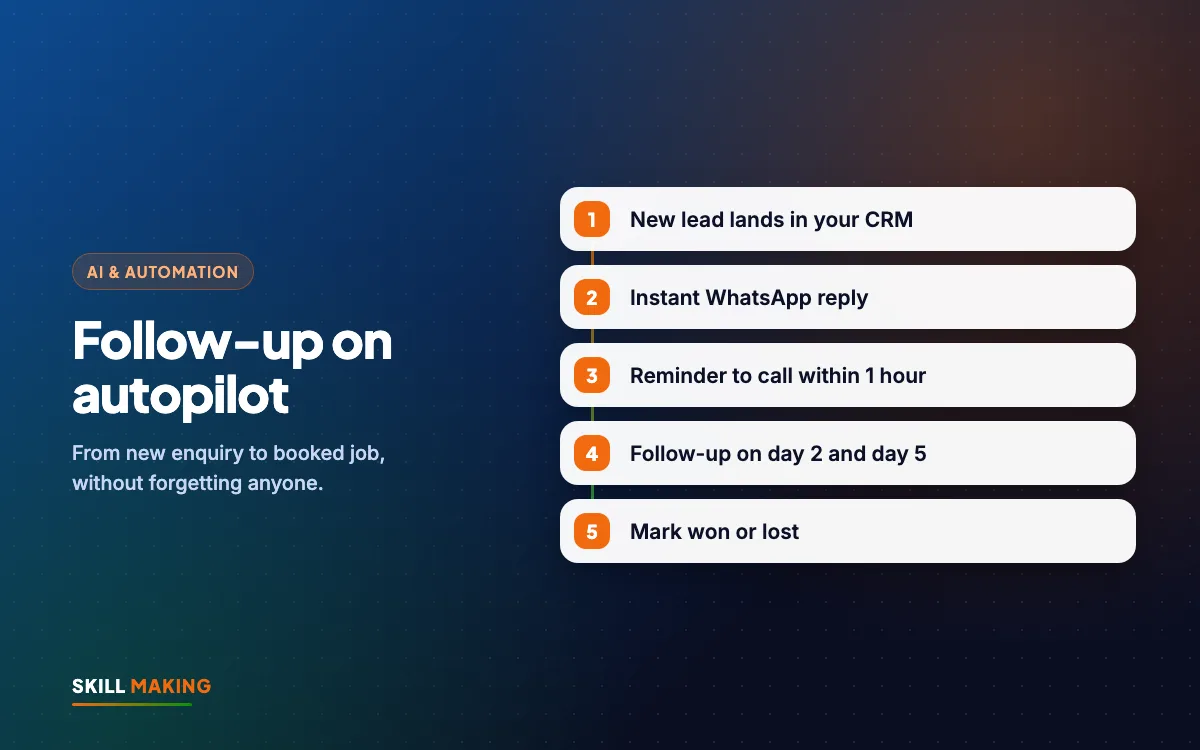
Follow-up is every contact after the first enquiry until the customer says yes or a clear no. For a small business, that usually looks like:
- Instant reply - "Thanks for your message, here is our price list. When would you like a visit?"
- Same-day personal reply - a real person answers the actual question.
- Day 2 or 3 reminder - if the customer goes quiet.
- Day 7 check-in - a helpful message, photo of recent work or a small reason to decide.
- Final message - polite close, with an open door for later.
Without a system, most businesses only manage the first one or two steps. When you automate lead follow-up, the system does the remembering and you do the talking.
Here is the journey a lead should follow, from first search to becoming a customer:
- Searches on Google“best clinic in your town”
- Opens your websiteFast and clear on mobile
- Sees photos & reviewsTrusts you in seconds
- Taps WhatsApp or CallThe enquiry reaches you instantly
- Visits and buysAnd comes back again
The simple tools you need to automate lead follow-up
You can build a working system with tools most small businesses already have or can get free.
WhatsApp Business app
The free WhatsApp Business app has features made for this job:
- Greeting message - sent automatically when a new customer messages you for the first time.
- Away message - sent outside your working hours, so night enquiries still get a reply.
- Quick replies - saved answers you can send with a shortcut, such as your price list or location.
- Labels - colour tags like "New lead", "Quote sent", "Follow up", "Won" and "Lost".
- Catalog - your services or products with photos and prices.
- Business profile - address, hours, website and email in one place.
For larger volumes, the WhatsApp Business Platform (the API) allows automated templates and connection with a CRM, usually through an approved provider. Most small businesses should start with the free app and move up only when they need it.
A simple CRM
A CRM is just an organised list of leads with their status and next follow-up date. It can be:
- A Google Sheet with columns for name, phone, source, service, status, last contact and next follow-up date. This works well for many small businesses.
- A free CRM tool such as the free plans offered by HubSpot or Zoho, which add reminders, pipelines and a mobile app.
- A CRM built into your website or booking system, if you already use one.
The best CRM is the one your team will actually update every day.
How to automate lead follow-up: step-by-step setup
Here is the setup we recommend for most local businesses. You can do it in a few days.
- List every place leads come from. Phone calls, WhatsApp, website form, Google Business Profile, Facebook and Instagram, walk-ins and referrals. Write them down.
- Send all of them to one place. Website forms can send a copy to WhatsApp or straight into your sheet or CRM. Meta lead ads can connect to a sheet or CRM. Calls and walk-ins are entered by hand at the end of each call.
- Set your WhatsApp greeting and away messages. Keep them short, friendly and useful: thank them, say when a person will reply, and share one helpful link.
- Create five quick replies for the questions you get every day: prices, location, timings, process and booking.
- Create your labels in WhatsApp: New lead, Contacted, Quote sent, Follow up, Won, Lost.
- Set up your CRM columns or pipeline stages to match those labels.
- Add a next follow-up date to every lead. This is the most important column. No lead should exist without a next date.
- Turn on reminders. Free CRMs can send task reminders. In Google Sheets, you can sort or filter by date each morning, or use simple automation tools to send a daily list of follow-ups due today.
- Write your follow-up messages once and save them as quick replies.
- Hold a 10-minute review every morning. Look at follow-ups due today and send them.
If you would like this built for you, including the form-to-WhatsApp and form-to-CRM connections, our AI automation service sets it up and trains your team.
Follow-up message templates you can copy
Here are simple templates. Change the words to match how you speak.
Instant greeting: "Namaste! Thanks for contacting Sharma Dental Clinic. We will reply personally within the hour during clinic timings. You can find our timings and location on our Google Maps listing."
Same-day reply after a quote: "Hi Rohit ji, as discussed, here is the quote for painting your 3BHK. It includes material and labour. Happy to answer any questions. Would a site visit on Saturday suit you?"
Day 3 reminder: "Hi Rohit ji, just checking if you had a chance to look at the quote. If you want any changes in the colours or scope, tell me and I will update it."
Day 7 helpful check-in: "Hi Rohit ji, sharing photos of a similar home we finished last week in your area. Let me know if you would like to go ahead or if the timing is not right yet."
Polite close: "Hi Rohit ji, I will not disturb you further. Whenever you are ready, just message here and we will help."
Notice what these messages do: they use the person's name, refer to the actual job, give one clear next step, and never pressure.
Where AI fits in
Once you automate lead follow-up with WhatsApp and a CRM, AI can make it faster without making it robotic:
- Drafting replies for unusual questions, which you then check.
- Summarising a long chat before you call a customer back.
- Sorting enquiries by service type or urgency.
- Writing personalised follow-ups from your notes, such as "mention the leaking terrace and the monsoon timing".
Keep a human in charge of pricing, promises and sensitive conversations. Our guide on using AI without losing the human touch explains where to draw the line.
Examples by type of business
- Coaching and schools: enquiry from the website form goes to WhatsApp and the sheet; the counsellor calls the same day; the system reminds them to share the fee structure and demo class dates. See our page on websites for schools and institutes.
- Clinics and hospitals: appointment requests get an instant reply with timings; staff confirm the slot; a reminder message goes the day before. Read more on hospital websites.
- Contractors and builders: every quote request is logged with the site address; follow-ups are scheduled after the site visit and after the quote is sent.
- Restaurants and cafes: party and catering enquiries get the menu instantly and a follow-up two days later.
- Home services in Florida: HVAC, roofing and plumbing leads get an instant text or WhatsApp reply and a call-back reminder, which matters because customers often contact several companies at once. See website design in Tampa, Florida.
Measuring if your follow-up system works
The point of trying to automate lead follow-up is more customers, so measure it. You do not need complex reports. Once a month, check:
- How many leads came in and from which source.
- How quickly you replied on average. Faster is usually better.
- How many leads had a next follow-up date. The answer should be all of them.
- How many became customers and from which source.
The value of a single saved lead is often bigger than people expect. Use this calculator to see how many extra customers it would take to pay for a better system:
pays for the whole website
After that, every customer the website brings is extra income — month after month.
One-time website price; domain and hosting are about ₹2,500–₹6,000 a year extra.
For a full method, read how to measure marketing ROI and cost per lead explained.
Mistakes to avoid
- Over-automating. If every message is a bot, customers feel ignored. Automate the reminders, not the relationship.
- Spamming people. Three to four follow-ups over a week or two is usually enough. Stop when someone says no.
- Messaging people who never contacted you. Only follow up with people who enquired or agreed to hear from you.
- Leads in personal phones. If a salesperson leaves, their leads should not leave too. Use a shared business number and CRM.
- No next date. A lead without a next follow-up date is a forgotten lead.
- A slow or confusing website. If your site does not make it easy to WhatsApp or call, fewer leads come in at all. A mobile-first website with clear buttons fixes that.
What to do next
This week, list your lead sources, set up your WhatsApp greeting, away message, quick replies and labels, and create a simple sheet with a next follow-up date column. That alone will help you automate lead follow-up and stop losing enquiries you already paid to get.
If you want us to connect your website, ads and WhatsApp into one system, ask for a free audit. We will show you exactly where leads are leaking today. Need a website that captures leads properly? Get a free website plan.