
In 2026, the digital landscape has shifted so rapidly that nearly 90% of all construction and home service leads now begin with an online search. For small businesses, building a digital foundation is now as critical as the concrete poured at a job site. The introduction of advanced models like GPT-5.5 has transformed “website building” from a months-long technical ordeal into a process that can initiate in under seven minutes. However, while speed is revolutionary, the gap between a “generated” site and a “high-converting lead machine” remains significant. Finding the best AI tool for web development is no longer just about convenience; it is about survival in a national market valued at over $2.145 trillion.
Why AI Tools Are Transforming Web Development in 2026?
Artificial Intelligence has moved beyond simple text generation. Today, AI for web developers integrates spatial layout logic, automated accessibility standards, and predictive user experience (UX) design. These advancements are not just technical gimmicks—they are fundamental shifts in how businesses connect with clients.
- Generative Engine Optimization (GEO): Modern AI builders automatically structure content to be cited by AI search assistants like ChatGPT Search and Google Gemini.
- Hyper-Personalization: Models like GPT-5.5 allow for smarter user experiences that adapt to a visitor’s specific intent.
- Predictive UX: AI can now predict where a user will click next, allowing for “frictionless” interfaces where users are never more than one click away from calling you.
- Multilingual Mastery: For businesses in diverse markets, AI provides instant, high-quality translations that respect local dialects and technical trade jargon.
While these tools are powerful, they require strategic oversight. Get a professional website built with the best AI tools by Skillmaking to ensure your machine-speed site has a human-touch finish.
Top 10 Best AI Tools for Web Development (Detailed Review)
1. Cursor AI
Cursor is a specialized AI code editor built for extreme productivity. It functions as an agentic workspace where the AI can index your entire codebase to provide context-aware suggestions.
- Best For: Professional developers and “vibe coders” wanting deep control.
- Pros: Native codebase indexing, semantic search, and “shadow workspace” features for testing changes in isolation.
- Cons: Higher learning curve than no-code tools.
- Pricing: Free tier available; Pro starts at $20/month.
2. GitHub Copilot
As a central AI partner, GitHub Copilot assists throughout the software development lifecycle, from writing initial boilerplate code to refactoring complex logic.
- Best For: Teams already using GitHub for CI/CD and version control.
- Pros: Seamless integration with GitHub Actions and Codespaces; high security with SOC 2 certification.
- Cons: Can sometimes produce legacy code patterns if not prompted correctly.
- Pricing: Individual plans at $10/month; Business plans available.
3. v0 by Vercel
v0 is an “agentic by default” platform designed to help users build websites through conversational prompts. It excels at creating UI components and landing pages in seconds.
- Best For: Rapid frontend development and UI prototyping.
- Pros: One-click deployment to Vercel; allows fine-tuning of typography and colors with live previews.
- Cons: Limited backend logic capabilities compared to full-stack agents.
- Pricing: Generous free tier; Pro tiers for higher traffic.
4. Lovable
Lovable is an emerging favorite for entrepreneurs, allowing users to go from a prompt to a functioning prototype in an afternoon.
- Best For: E-commerce (via Shopify integration) and rapid app prototyping.
- Pros: Can automatically create Shopify stores, generate product photography, and handle checkout logic.
- Cons: Custom features still require human developer intervention.
- Pricing: Subscription-based modular pricing.
5. Claude 3.5/4 (Anthropic)
Claude is widely considered one of the most capable models for complex professional work and coding agents. Its “Constitution” ensures safer, more reliable code generation.
- Best For: Writing complex logic, debugging, and data analysis.
- Pros: High reasoning capabilities; context windows that handle massive files.
- Cons: Primarily an LLM; needs to be integrated into an editor (like Cursor) for the best experience.
- Pricing: API-based or via Claude Pro ($20/month).
6. 10Web
10Web is a powerhouse for WordPress users, leveraging AI to automate hosting and page speed optimization.
- Best For: Small business owners who prefer the WordPress ecosystem.
- Pros: Guaranteed 90+ PageSpeed scores; automated site cloning and hosting.
- Cons: Can feel restrictive for developers wanting to go outside the WordPress framework.
- Pricing: Starts at ₹1,500/month for managed AI hosting.
7. Durable
Durable is the “sole proprietor’s friend,” capable of generating a complete website in just 30 seconds.
- Best For: Absolute beginners and very small local service businesses.
- Pros: Incredibly fast; includes basic CRM and lead-capture tools.
- Cons: The “Template Trap”—designs can look generic without heavy manual editing.
- Pricing: Starts at ₹1,000/month.
👉 Want an AI Website That Generates Real Leads & Customers? 📞 WhatsApp Today: +91 7906334941
8. Replit Agent
The Replit Agent handles full-stack development by setting up databases, servers, and frontends automatically from a single prompt.
- Best For: Building functional web apps and prototypes with minimal setup.
- Pros: Handles deployment and backend environment setup automatically.
- Cons: Can be expensive for high-resource applications.
- Pricing: Part of Replit Core/Pro plans.
9. Elementor AI
For those already using Elementor on WordPress, the integrated AI helps generate text, code, and images directly within the page builder.
- Best For: Design-heavy WordPress sites.
- Pros: Contextual AI within a familiar drag-and-drop interface.
- Cons: Dependent on the Elementor plugin ecosystem.
- Pricing: Modular add-on to Elementor subscriptions.
10. Google AI Studio (Antigravity)
Google’s overhaul of AI Studio includes “Antigravity,” a coding agent that builds full-stack environments including databases and user authentication.
- Best For: Vibe coding and building Google-integrated applications.
- Pros: Free access to Gemini 3.1 Pro; integrated with Firebase and Google Maps API.
- Cons: Agent requires very specific, detailed prompts to avoid errors.
- Pricing: Free for prototyping; API usage costs apply for scale.
Head-to-Head Comparison: Best AI Tools for Web Development
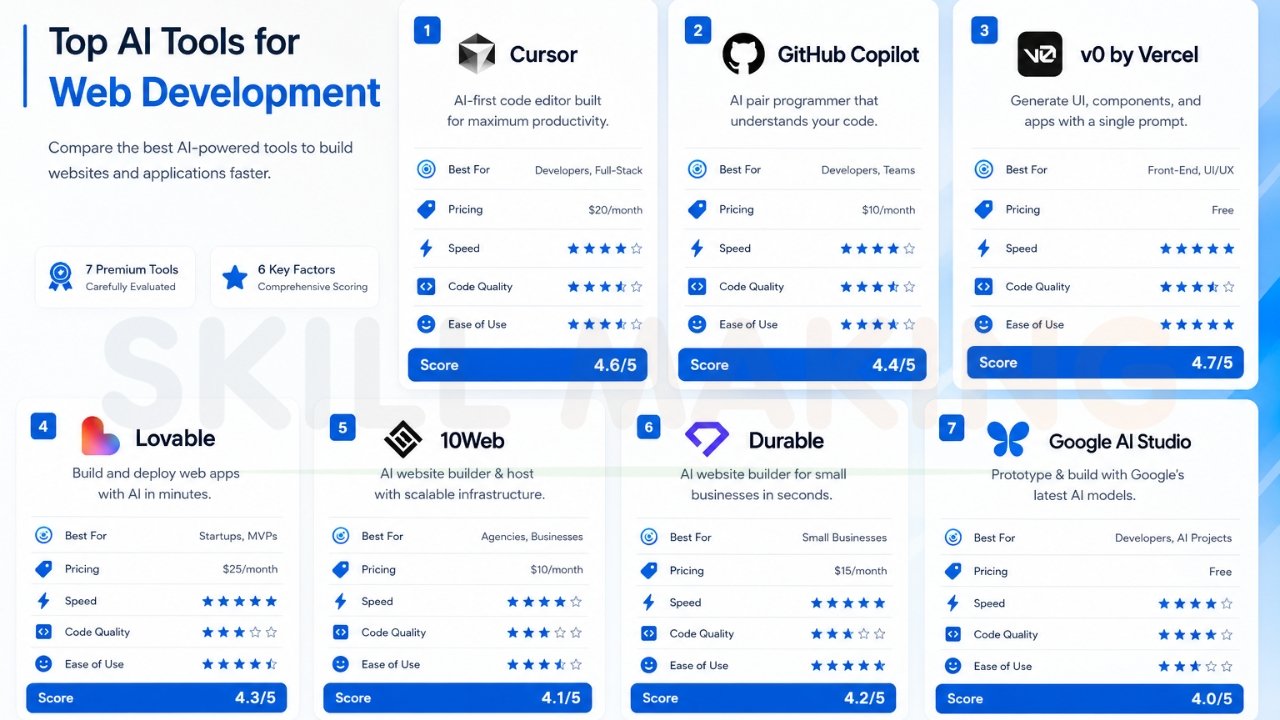
| Tool | Best For | Pricing | Speed | Code Quality | Ease of Use | Score |
|---|---|---|---|---|---|---|
| Cursor | Professional Devs | $20/mo | Fast | Elite | Medium | 9.5/10 |
| GitHub Copilot | Team Collab | $10/mo | Instant | High | High | 9.0/10 |
| v0 by Vercel | Frontend/UI | Free/$20 | Ultra-Fast | Clean | High | 9.2/10 |
| Lovable | Startups/SaaS | Varies | Fast | High | High | 8.8/10 |
| 10Web | WordPress | ₹1,500/mo | Medium | Good | High | 8.5/10 |
| Durable | Sole Traders | ₹1,000/mo | 30 Seconds | Basic | Ultra-High | 7.5/10 |
| Google AI Studio | Prototypes | Free | Fast | High | Medium | 8.7/10 |
Best AI Tools for Different Needs
- For Frontend Development: v0 by Vercel and Lovable are unmatched for building beautiful, responsive interfaces quickly.
- For Full-Stack Applications: Cursor (paired with Claude 4) and Replit Agent provide the best tools for managing databases and server-side logic.
- For Managed WordPress: 10Web remains the king of performance-optimized AI WordPress sites.
- For No-Code/Beginners: Wix ADI 2.0 or Durable allow you to launch without seeing a single line of code.
Special Recommendations for Small Businesses & Construction Companies
For those in the $2.145 trillion construction market, your website is the bridge between physical craftsmanship and digital vetting.
- Prioritize “Speed to Lead”: Ensure your tool allows for the integration of floating WhatsApp buttons and click-to-call layouts.
- Highlight Compliance: In markets like Florida, displaying HVHZ (High-Velocity Hurricane Zone) compliance is non-negotiable for building trust.
- Interactive Galleries: Use AI to generate before-and-after sliders and 3D product visualizations for remodeling projects.
Let Skillmaking combine top AI tools with expert development to ensure your construction business doesn’t just have a site, but a lead-generation machine.
Common Mistakes When Choosing AI Web Development Tools
Even with advanced tools, many firms fail due to avoidable errors. A primary issue is the lack of a professional, mobile-optimized website, which often leads to a loss of credibility and high bounce rates.
- The “Template Trap”: Using a tool like Durable without customization results in a site that looks exactly like your competitors.
- Ignoring Local SEO: AI often fails to target “hyper-local” keywords like “Luxury Residential in Miami”.
- The Referral Trap: Believing referred clients don’t check your site is a mistake; 75% judge your credibility based on web design.
- Slow Follow-Up: Failing to integrate automated lead responses can destroy trust; responding within minutes significantly increases your chances of securing a contract.
To avoid these, learn how to avoid common marketing mistakes construction companies make and understand what is marketing in the construction industry—it’s about trust, not just logos.
AI Tools vs Professional Web Development – When to Use Each
| Factor | AI Tools (DIY) | Professional Design (Skillmaking) |
|---|---|---|
| Time Investment | Very High (Learning & Refining) | Minimal (Hands-off process) |
| SEO Performance | Basic / Generic | Expert Hyper-Local SEO |
| Security | Standard / Generic | Advanced SSL & Privacy Protection |
| Lead Conversion | Uncertain / Basic | Average 312% increase in leads |
While AI tools are impressive, they are often a “maintenance trap” for professional businesses. You didn’t start a construction or plumbing business to become a part-time web developer.
How Skillmaking Uses the Best AI Tools + Human Expertise for Superior Results?
At Skillmaking, we don’t just “generate” sites; we build high-converting platforms using a “Humans with AI” approach.
- Market Analysis: We identify “missing circuits” in your strategy based on your specific city.
- Technical Development: We use lightning-fast frameworks for instant loading, even on weak cell signals at job sites.
- Conversion Logic: We position “Get a Free Quote” buttons based on user psychology and “Speed to Lead” principles.
- Local Dominance: We know how to get more home improvement leads through hyper-local Google Business Profile optimization.

Frequently Asked Questions
- Can AI build a professional website in minutes? Yes, basic generation takes minutes, but an SEO-optimized, lead-gen site typically takes 7-15 days to refine for production.
- Is ChatGPT the best tool for coding? It’s excellent for logic, but specialized editors like Cursor offer better environment integration.
- Does AI handle my Local SEO? AI provides meta tags, but human expertise is needed to rank in the “Local Map Pack” for specific neighborhoods.
- Are AI-built websites secure? DIY platforms use standard security; professional firms like Skillmaking provide advanced SSL and Florida-compliant protections.
- What is “vibe coding”? It is a term for using natural language prompts in tools like Google AI Studio or Cursor to build apps without deep syntax knowledge.
- Can AI create a website from a sketch? Yes, tools like biCanvas or Dora AI can turn hand-drawn sketches into digital wireframes.
- Do I need a blog on my AI site? Yes, blogging for “high-intent” questions helps you rank for specific local searches.
- How much does a professional AI website cost? DIY platforms are ₹1,000–₹3,000/month; professional builds start around ₹15,000–₹1.5L+ depending on complexity.
- Will AI replace web developers? No, but developers using AI will replace those who don’t.
- What is the most important feature for a contractor site? “Speed to Lead”—instant ways for a customer to contact you, like WhatsApp buttons.
Conclusion: Start Building Your Digital Future Today
In 2026, your website is your most valuable business asset. While the best AI tool for web development has lowered the barrier to entry, the competition for high-margin contracts has never been more intense. Don’t let your craftsmanship be hidden by an outdated or generic online presence.
Take the first step toward a booked-out calendar and a powerful brand. Ready to 10x your bookings? Let Skillmaking combine top AI tools with expert development to secure your pipeline for years to come.
