
In the rapidly evolving digital landscape of 2026, the question of which software is used for web designing has become more complex than ever. The industry has shifted from simple static pages to immersive, AI-driven experiences where speed, accessibility, and high-converting design are non-negotiable. For businesses in competitive sectors like Florida construction, being “digitally invisible” can lead to losing up to 60% of potential leads to competitors with a stronger online presence.
Modern web design is no longer just about aesthetics; it is a strategic engine for building trust and attracting high-margin contracts. Whether you are a small business owner looking to build your first site or an agency professional seeking the latest web design tools 2026, understanding the right software stack is critical for success in a national market valued at over $2.145 trillion.
👉 Need a Professional Website for Your Business? 📲 Call/WhatsApp: +917906334941
Types of Software Used for Web Designing
The ecosystem of best web design software is generally divided into three major categories, each serving a distinct purpose in the creation process:
- UI/UX Design Software: These tools are used for wireframing, prototyping, and creating the visual layout of a site before a single line of code is written. They focus on user flow and interface aesthetics.
- No-Code & Low-Code Web Builders: These platforms allow users to build fully functional websites using visual interfaces, drag-and-drop elements, and AI assistance without requiring deep technical coding knowledge.
- Coding and Development Environments: For complex, bespoke applications, developers use professional code editors to write semantic HTML, CSS, and JavaScript from scratch.
Let Skillmaking design your website using the best professional tools to ensure your digital storefront acts as a 24/7 lead-generation machine.

Best Web Design Software in 2026 – Detailed Reviews
1. Figma: The Industry Standard for Prototyping
Figma remains the reigning champion of UI/UX design software. Its cloud-native platform allows for real-time collaboration, making it the go-to for design teams worldwide.
- Pros: Exceptional collaborative features, massive plugin library, and powerful prototyping capabilities.
- Cons: Requires a constant internet connection; steep learning curve for advanced interactive prototyping.
- Best For: Professional designers and agencies creating high-fidelity wireframes and prototypes.
2. Webflow: The Agentic Web Platform
Webflow has evolved into a comprehensive “agentic” platform that bridges the gap between design and development. It allows users to build high-performing websites with a visual CMS and AI-powered design systems.
- Pros: Produces clean, semantic code; offers AI-driven site builders; and includes native SEO tools.
- Cons: Monthly hosting costs are higher than traditional shared hosting; steeper learning curve than Wix.
- Best For: Marketers and designers who want enterprise-grade scalability without a full development team.
👉 Want a Modern AI-Powered Website Design? 📞 Call/WhatsApp: +917906334941
3. Adobe Creative Cloud (Photoshop, Illustrator, Firefly)
Adobe continues to dominate the creative space by integrating generative AI through Adobe Firefly. These professional web design programs are essential for creating the high-resolution assets and unique visuals that set premium brands apart.
- Pros: Unmatched image editing and vector creation; new AI-powered “Generative Fill” and content orchestration.
- Cons: High subscription costs; complex tools that require professional training.
- Best For: Creating custom high-end visual assets and professional project galleries.
4. WordPress.org (with Elementor or Gutenberg)
WordPress.org remains the most popular open-source content management system, powering a significant portion of the web. In 2026, its focus on “blocks” and AI integration makes it more accessible than ever.
- Pros: Total ownership of data; vast plugin ecosystem for stores, analytics, and SEO.
- Cons: Requires manual maintenance, updates, and security management.
- Best For: Small businesses and contractors who want a scalable, long-term digital asset.
5. Wix and Squarespace: The DIY Leaders
These platforms are the best software for website design for absolute beginners. They offer intuitive drag-and-drop interfaces and pre-designed templates that allow a business to go live in days.
- Pros: Very low barrier to entry; all-in-one hosting and support.
- Cons: Limited flexibility for advanced SEO; you do not “own” the site files.
- Best For: Solopreneurs and very small businesses just starting their digital journey.
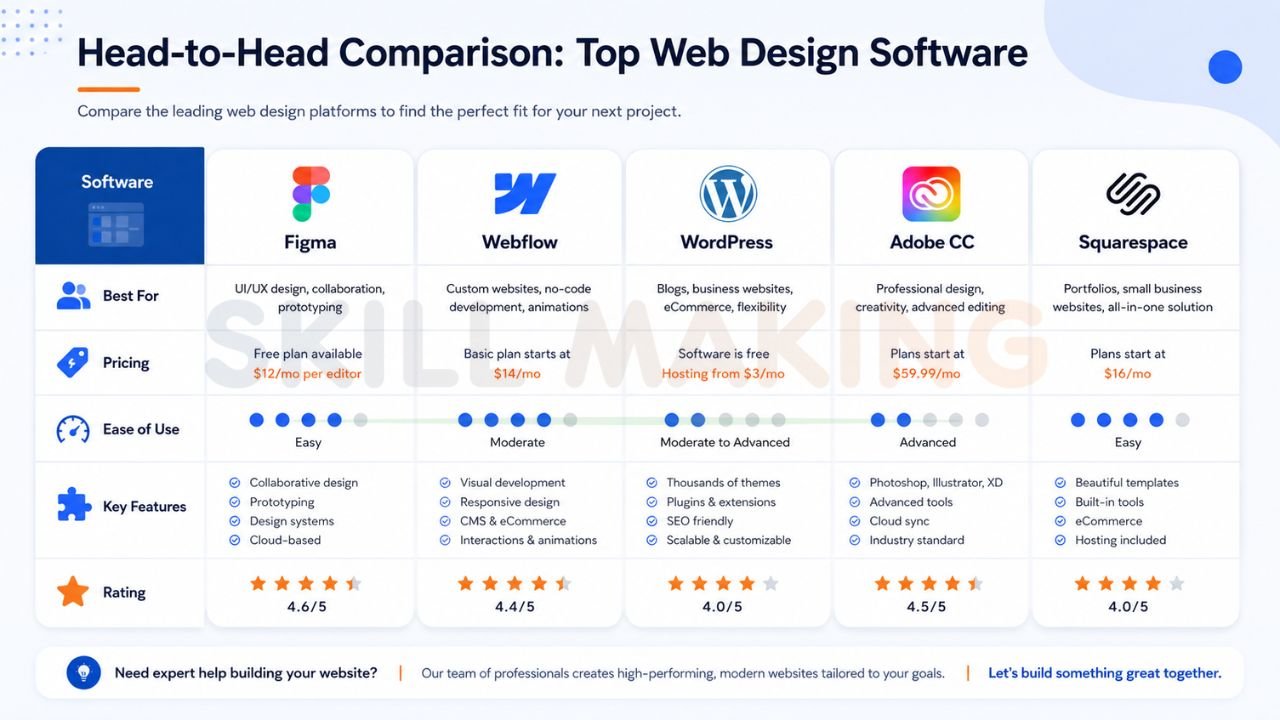
Head-to-Head Comparison Table: Top Web Design Software
| Software | Best For | Pricing | Ease of Use | Key Features | Rating |
|---|---|---|---|---|---|
| Figma | Prototyping | Free – $15/mo | Moderate | Real-time Collab, Prototyping | 9.5/10 |
| Webflow | Marketing Sites | $14 – $39/mo | Hard | Clean Code, AI Builder, CMS | 9.2/10 |
| WordPress | Scalability | Free (Software) | Moderate | Plugins, SEO, Full Ownership | 9.0/10 |
| Adobe CC | Visual Assets | $59/mo | Hard | Firefly AI, Pro Image Editing | 8.8/10 |
| Squarespace | DIY Beauty | $16 – $49/mo | Easy | Drag-and-drop, Templates | 8.0/10 |
Get a custom website designed by experts at Skillmaking who use these industry-leading tools to maximize your ROI.
👉 Get Website Design, SEO & Lead Generation Services – 📲 Chat Now: +917906334941
Best Software for Different Users
Choosing the best web design software depends heavily on your technical proficiency and business goals:
- Beginners: Wix or Squarespace are ideal for those who need a functional site quickly without learning technical jargon.
- Small Businesses: WordPress.org provides the best balance of cost-effectiveness and long-term scalability.
- Agencies & Pros: Figma and Adobe Creative Cloud are essential for delivering high-end, custom client work.
- Developers: Visual Studio Code combined with frameworks like Tailwind CSS remains the gold standard for bespoke, lightning-fast sites.
Special Recommendations for Construction & Home Improvement Businesses
In the construction industry, your website is your “digital site office”. It must be optimized for the 80% of leads who search on mobile devices, often while on-site or during emergencies.
- Priority 1: Mobile-First Design. Use tools like Webflow or professional WordPress setups that ensure sites load in under 2 seconds.
- Priority 2: Visual Authority. Utilize Adobe’s AI tools to enhance “Before and After” sliders and high-resolution project galleries.
- Priority 3: Instant Lead Capture. Software that allows for easy integration of WhatsApp buttons and “Click-to-Call” features is mandatory for trades like plumbing or emergency roofing.
Understanding what is marketing in the construction industry—specifically as a strategic engine for building trust—is the first step toward choosing the right tools.
Must-Have Features in Modern Web Design Software
To compete in 2026, any software you choose must support these critical standards:
- AI-Powered Optimization: Tools that offer automated image compression, copy generation, and layout suggestions.
- Responsive Design Engines: A “mobile-first” approach is no longer optional; it is the industry standard.
- Built-in SEO Tools: The software should allow for easy management of meta descriptions, alt text, and site maps.
- Security & SSL: Mandatory for search engine ranking and user trust.
- Integration Capabilities: Seamlessly connecting to CRMs (like HubSpot), email marketing, and instant messaging.
👉 Turn Your Website into a Lead-Generating Machine – 📲 Contact: +917906334941
Common Mistakes When Choosing Web Design Software
Many firms waste thousands on unoptimized setups by falling into these traps:
- Ignoring the Foundation: Trying to market a business without a professional website is like building a skyscraper on a swamp.
- Overcomplicating for Beginners: Choosing a tool that is too difficult to update leads to “outdated content” which deters 70% of potential visitors.
- Prioritizing Beauty Over Speed: Large, unoptimized images cause high bounce rates. Sites taking over 3 seconds to load are considered “broken” by users.
You can avoid common marketing mistakes construction companies make by partnering with experts who understand the technical “under-the-hood” requirements for high rankings.
Coding Tools vs No-Code Builders vs Professional Design Software
While no-code web design tools have become incredibly powerful, there is still a hierarchy of control:
- No-Code (Wix/Squarespace): You “rent” the platform. It’s easy but lacks deep technical SEO performance.
- Hybrid (Webflow/WordPress): Offers the flexibility of code with the speed of visual building.
- Pure Code (React/Tailwind): Provides total control but requires significant time and high-level expertise.
For many, the question is how to get more home improvement leads—and the answer consistently starts with a robust, professional digital storefront that balances these three types of software.
How Skillmaking Uses Professional Web Design Software to Deliver Outstanding Results
At Skillmaking, we don’t just build “pretty” websites; we build lead-generation machines. We utilize a high-performance stack—including Figma for design, WordPress for scalability, and Adobe CC for visual excellence—to ensure our clients dominate their local markets.
Our specialized approach has resulted in:
- 3.8x Average Growth in organic traffic for our clients within six months.
- 312% Increase in qualified lead requests for specialized trades.
- 74% Lead Conversion Rate driven by optimized trust signals and high-speed performance.
Frequently Asked Questions
- Can’t I just use social media instead of a website?
Social media is for engagement, but you do not own the platform. A website is your digital property where you control the data and design. - Is a DIY website builder good enough?
They are fine for starting out, but often lack the deep technical optimization required for high search rankings in competitive markets. - How long does it take to see SEO results from these tools?
Technical setup is fast, but organic SEO growth typically takes 3–6 months to fully mature. - What is the best software for mobile optimization?
Webflow and professional WordPress themes are leading the industry in “mobile-first” responsiveness. - Do I really need AI in my web design software?
In 2026, AI helps with speed-to-market, cost-efficiency, and ensuring visibility in AI-driven search results (AEO/GEO). - How much does a professional marketing website cost?
For growing contractors in markets like Florida, a high-quality lead-generating platform typically ranges from $5,000 to $10,000. - How often should I update my web design software?
Most businesses should refresh their site design every 2–3 years to keep up with modern technology and security standards. - Can a website help me find better employees?
Yes. A professional website makes your company look like an industry leader, attracting more skilled labor in a competitive market. - What is Figma best used for?
Figma is best for the early planning stages—wireframing and prototyping the user experience before building the live site. - How do I track if my chosen software is working?
Integrate tools like Google Analytics and call tracking to see exactly which keywords and pages are generating your best leads.
Conclusion: Build Your Digital Future Today
Choosing which software is used for web designing is one of the most important decisions for your business’s growth in 2026. While tools like Figma, Webflow, and WordPress provide the building blocks, it is the strategic application of these tools that turns a website into a high-converting asset.
In a competitive landscape, your “digital site office” is just as important as your physical one. Don’t let your craftsmanship be hidden by an outdated or unoptimized online presence. Whether you are a local builder or a large-scale firm, your digital foundation will determine your growth.
Ready to dominate your market with a high-performing website?
Stop waiting for the phone to ring. Contact Skillmaking today to build a custom, lead-generating storefront designed for the 2026 market.
- WhatsApp Us Now: +91-7906334941
- Visit Our Services: Professional Website Design by Skillmaking
- Get Started: Let Skillmaking design your website using the best professional tools
