
Choosing a website platform in 2026 is no longer just about “picking a template.” We live in an era where page speed, AI-driven user experiences, and mobile core vitals determine whether a potential customer stays on your site or bounces to a competitor. Your website is the digital headquarters of your brand. If you’re a small business owner, a freelancer, or an e-commerce entrepreneur, the foundation you build on today will either accelerate your growth or become a technical debt you’ll pay for later.
👉 Need a Professional Website for Your Business? 📲 Call/WhatsApp: +917906334941
The landscape has shifted. Wix has moved beyond a simple drag-and-drop tool into a more robust SEO contender. Squarespace has doubled down on its “aesthetic-first” philosophy while integrating smarter commerce tools. Shopify remains the undisputed heavyweight for retail, and WordPress continues to offer the ultimate freedom for those who want to own their digital assets entirely.
In this “Wix vs Squarespace vs WordPress vs Shopify” comparison, we’re going to strip away the marketing fluff and look at the raw data, real-world performance, and hidden costs to help you make a confident decision.
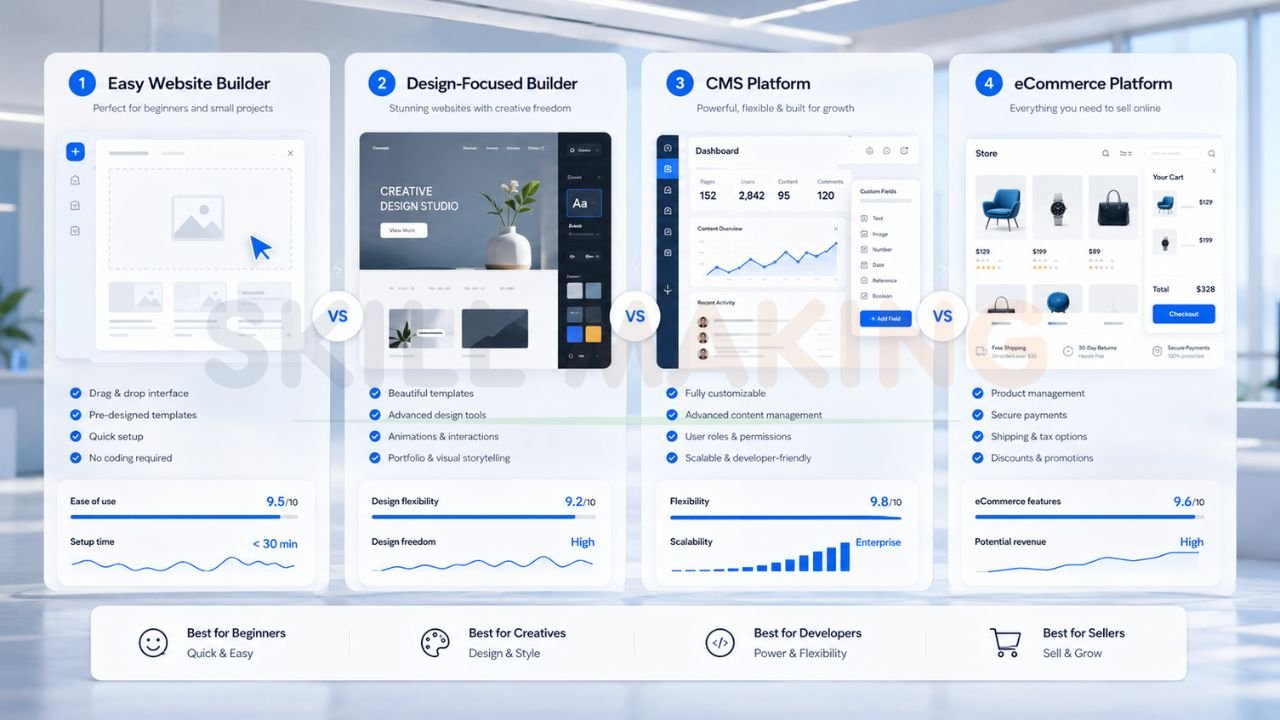
Quick Overview of the Big Four
Before we dive into the nitty-gritty, let’s establish what these platforms actually are and who they were built for.
Wix: The Ultimate Beginner-Friendly Drag-and-Drop
Wix is the world’s most popular “website builder.” It uses an unstructured editor, meaning you can literally drag an image or a button anywhere on the page. In 2026, their AI-site generator has become incredibly sophisticated, allowing you to build a functional site in minutes.
- Best for: Small service businesses, local shops, and beginners who want total visual control without touching a line of code.
Squarespace: The Aesthetic Masterpiece
Squarespace is the go-to for creatives. It uses a “grid-based” drag-and-drop system, which is slightly more restrictive than Wix but ensures your site always looks professionally designed. It is highly polished and “all-in-one.”
- Best for: Photographers, designers, artists, and boutique brands where visual storytelling is the priority.
WordPress: The Limitless Giant
WordPress (specifically WordPress.org) is an open-source content management system (CMS). It powers over 40% of the internet. Unlike the others, you “own” your site, but you are responsible for hosting, security, and updates.
- Best for: Bloggers, high-growth businesses, and anyone who wants a custom-built solution that can scale infinitely.
Shopify: The E-commerce Powerhouse
Shopify is built for one thing: selling products. It handles everything from inventory management to complex shipping calculations and global payments. It is incredibly stable and optimized for high conversion rates.
- Best for: Serious online sellers, dropshippers, and retail brands looking to scale their revenue.
👉 Get Website Design, SEO & Lead Generation Services – 📲 Chat Now: +917906334941
Ultimate Side-by-Side Comparison Table
| Feature | Wix | Squarespace | WordPress | Shopify |
|---|---|---|---|---|
| Ease of Use | Very High | High | Moderate/Low | High |
| Design Freedom | Total (Unstructured) | High (Grid-based) | Limitless (with Code) | High (Commerce focused) |
| SEO Control | Good | Moderate | Exceptional | Good |
| E-commerce | Basic/Mid-range | Mid-range | Advanced (WooCommerce) | Best-in-Class |
| Scalability | Limited | Moderate | Infinite | High |
| Maintenance | Zero (Done for you) | Zero (Done for you) | Required (Updates/Backups) | Zero (Done for you) |
| Monthly Cost | Mid ($20 – $150+) | Mid ($16 – $50+) | Low (Hosting only) | High ($39 – $2000+) |
In-Depth Pros and Cons of Each Platform
Wix
The Pros:
- Total Creative Freedom: You aren’t boxed into a specific layout.
- AI Integration: Wix ADI (Artificial Design Intelligence) can build a starting point for you based on a few questions.
- App Market: Thousands of integrations for bookings, live chat, and forums.
- Managed Hosting: No need to worry about server updates or security patches.
The Cons:
- Template Lock-in: Once you choose a template, you can’t switch it later without rebuilding your content.
- Site Speed: Because the editor allows so much “freedom,” it’s easy for beginners to bloat their site with heavy images and scripts, slowing it down.
- Pricing Complexity: Costs can climb quickly as you add more premium apps.
Squarespace
The Pros:
- Stunning Templates: Hands-down the best-looking out-of-the-box designs in 2026.
- Mobile-First Design: Fluid Engine ensures your mobile site looks as good as the desktop version.
- Inventory & Booking: Excellent built-in tools for service providers to manage appointments.
- Simplified Interface: Very clean and intuitive back-end for non-techies.
The Cons:
- Less Flexible for SEO: While it covers the basics, advanced technical SEO is harder to implement.
- Limited App Ecosystem: Compared to Shopify or WordPress, the library of third-party extensions is small.
- No Free Tier: You must pay to keep your site live beyond the trial.
WordPress
The Pros:
- Complete Ownership: You are the landlord of your digital property, not a tenant.
- SEO Superiority: With tools like RankMath and deep access to code, you can outrank almost any competitor.
- Infinite Customization: If you can dream it, a professional developer can build it on WordPress.
- Massive Community: Tens of thousands of themes and plugins (free and paid).
The Cons:
- Steep Learning Curve: Not beginner-friendly for those who want a “set it and forget it” solution.
- Maintenance Burden: You must manage your own security, backups, and plugin updates.
- Hidden Costs: While the software is free, high-quality hosting, premium themes, and developer help add up.
Shopify
The Pros:
- Optimized for Sales: Everything from the checkout flow to the product pages is designed to maximize conversion rates.
- App Ecosystem: The best e-commerce apps for marketing, upselling, and shipping.
- Rock-Solid Hosting: Your site won’t crash during a Black Friday surge.
- 24/7 Support: World-class customer service specifically for sellers.
The Cons:
- Expensive Transaction Fees: If you don’t use Shopify Payments, they take a cut of every sale.
- App Dependency: Most essential features for scaling require monthly paid apps.
- Rigid Content Management: Not the best platform for content-heavy blogs or informational sites.
👉 Launch Your Business Website Faster – 📞 WhatsApp: +917906334941
Best Platform For Different Needs
1. Simple Business / Service Websites
If you just need a “digital business card” or a 5-page site to explain your services, Wix or Squarespace are the winners. They allow you to get online fast without hiring a developer. However, if your business is in a competitive niche like construction or healthcare, a custom WordPress solution is often better for local SEO dominance.
2. Creative Portfolios & Blogs
For those whose work is purely visual—photographers, architects, or interior designers—Squarespace is the gold standard. For professional bloggers who want to monetize via ads and affiliate links, WordPress is the only serious choice because of its superior content structure and SEO power.
3. Online Stores & E-commerce
If your primary goal is to sell physical products, Shopify is the undisputed champion. It’s easier to manage than WooCommerce (WordPress) and more powerful than the e-commerce tools in Wix or Squarespace.
4. High-Growth Scalable Businesses
When you plan to scale from 100 visitors a month to 100,000, you need WordPress or Shopify Plus. These platforms handle high traffic and complex integrations far better than “all-in-one” builders.
Real Performance Comparison in 2026: Speed, SEO, and Mobile
In 2026, Google’s algorithms have evolved to prioritize “Actual User Experience” over keywords. Here is how they stack up:
- Speed: Shopify and Squarespace perform well because their code is managed and optimized. WordPress can be the fastest, but only if you use high-end hosting and clean code. A poorly built WordPress site is often the slowest of the bunch. You can check your current performance using Google PageSpeed Insights.
- SEO Results: WordPress still takes the crown. The ability to control schema markup, site architecture, and indexation is unparalleled. Wix has made massive strides and is now a viable option for many small businesses, while Squarespace remains adequate for low-competition niches.
- Mobile Experience: Squarespace and Shopify are excellent here. Because they are closed systems, they force mobile responsiveness. Wix allows for mobile-only edits, which gives you more control but requires more work.
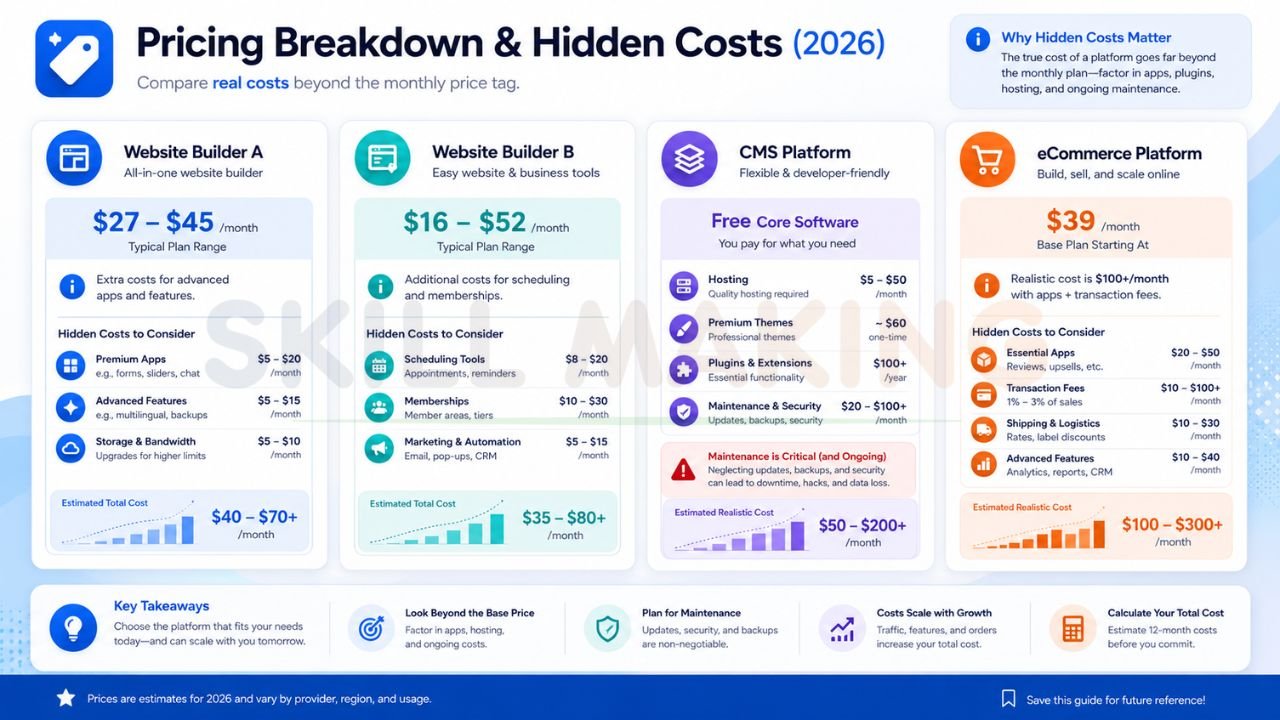
Pricing Breakdown & Hidden Costs
Don’t let the “Starting at $XX/month” fool you. Here is the reality:
- Wix: Expect to pay $27–$45/month for a decent business site. Hidden costs include premium apps for bookings or advanced forms.
- Squarespace: Pricing is transparent ($16–$52/month), but you’ll pay extra for their scheduling tools or member areas.
- WordPress: Software is free. Hosting costs $5–$50/month. Premium themes ($60) and plugins ($100+/year) are common. Maintenance (your time or a pro’s time) is the biggest hidden cost.
- Shopify: $39/month for the Basic plan, but once you add 3–4 essential apps, you’re looking at $100+/month plus transaction fees.
When You Should Choose Each Platform
- Choose Wix if: You want to build it yourself, you want it to look exactly like your vision, and you aren’t planning on having thousands of products.
- Choose Squarespace if: You are a creative professional and you want the most beautiful website possible with the least amount of technical headache.
- Choose WordPress if: You want to own your site, you care deeply about SEO, and you want the ability to add any feature imaginable in the future.
- Choose Shopify if: Selling products is your main source of income and you want a platform that “just works” so you can focus on marketing.
How Skill Making Helps You Get a Professional Website
While DIY builders have their place, many business owners find themselves frustrated after 20 hours of trying to make a template look “right.” At Skill Making, we believe your website should be a high-converting asset, not a weekend hobby.
We specialize in professional custom website design and e-commerce solutions that go beyond what a standard template can offer. Our team focuses on:
- Custom Design: We don’t just “fill in the blanks.” We build sites that reflect your unique brand identity.
- SEO Optimization: We implement powerful local SEO strategies to help you rank higher on Google search results—something we’ve successfully done for contractors across Florida.
- Conversion Focus: We design project galleries, bid forms, and service pages optimized for conversions from day one.
- Scalability: We build on foundations that grow with you, ensuring you don’t have to rebuild your site every two years.
If you’re tired of fighting with drag-and-drop editors and want a site that actually moves the needle for your business, we’re here to help. Our strategies have helped clients see an average organic traffic increase of 3.8 times within just six months.
Final Verdict & Recommendation
In the “Wix vs Squarespace vs WordPress vs Shopify” battle, there is no single winner—only the best fit for your specific stage of business.
- For the true beginner: Go with Wix.
- For the visual artist: Go with Squarespace.
- For the serious retailer: Go with Shopify.
- For the long-term entrepreneur: Go with WordPress.
If you want the absolute best performance, the highest SEO rankings, and a site that you truly own, a custom-built WordPress or Shopify site (depending on your business model) is the superior choice.
Conclusion
The right platform is the one that allows you to focus on running your business, not fixing your website. Whether you choose the simplicity of Squarespace or the power of WordPress, make sure your decision aligns with your 5-year growth plan, not just your 5-minute budget.
Ready to build a website that actually works?
Stop guessing and start growing. Visit Skill Making’s Website Design page to see how we can build a high-performing site for you.
Contact us today:
- Website: skillmaking.com
- WhatsApp Expert Guidance: +91-7906334941
