
The digital landscape has shifted dramatically. In 2026, the question is no longer if your business needs a website, but how fast you can get one online. Recent data suggests that approximately 75% of consumers judge a company’s credibility based solely on its website design. Yet, many entrepreneurs remain “digitally invisible” because they believe a professional presence requires a massive upfront investment.
If you are wondering how to create a website for business for free, you are in the right place. Whether you are a local plumber, a boutique consultant, or a growing contractor, the tools available today allow you to build a functional, attractive site without spending a single dollar. This guide provides a detailed, 2026-ready roadmap to launching your no-cost business website and understanding when it’s time to move toward a more robust, professional website design for higher conversion.
👉 Want a Free Website for Your Business? 📲 Call/WhatsApp: +917906334941
Why Every Small Business Should Have a Website (Even on a Zero Budget)
In 2026, a website is your most valuable employee. It works 24/7, answering questions, showcasing your work, and capturing leads while you sleep. Relying solely on social media is a risk; you don’t own those platforms, and their algorithms can change overnight.
Even a no cost business website provides:
- Trust and Authority: A professional URL tells customers you are a legitimate entity, not just a hobbyist.
- Search Engine Visibility: Without a site, you won’t appear in “near me” searches, which are critical for local service providers.
- A Controlled Brand Message: Unlike review sites, your website allows you to tell your story exactly how you want it told.
- Lead Generation: Integrated contact forms and “Click-to-Call” buttons turn casual browsers into paying clients.
The U.S. Small Business Administration (SBA) emphasizes that a strong digital foundation is the first step in the 10-step process of starting a business in today’s economy.
Best Free Ways to Create a Website for Business in 2026
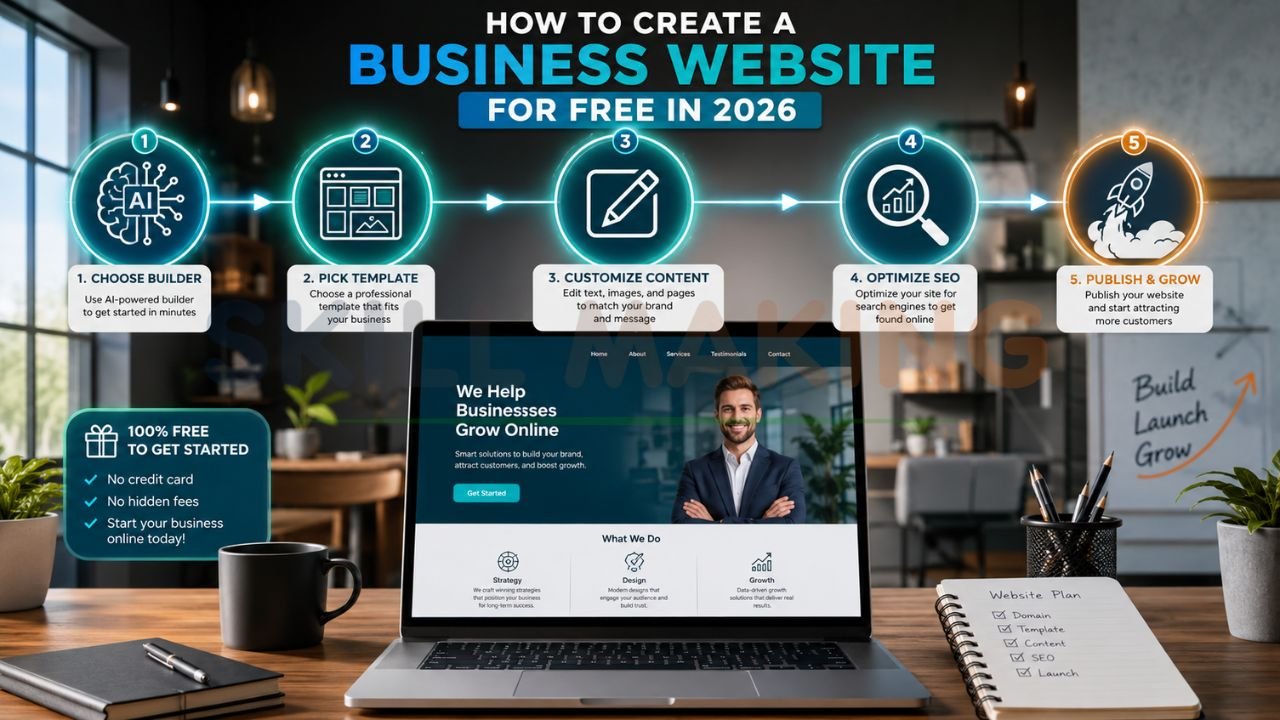
The technology for a free business website builder has evolved from clunky drag-and-drop tools to advanced “Design Intelligence” systems. In 2026, the most effective free methods involve:
- AI-Powered Builders: Platforms like Wix and Squarespace now use conversational AI to generate custom site sections and layouts based on your business type.
- Google Business Profile: For local service businesses, a personalized Google listing acts as a mini-website that appears directly in Search and Maps.
- No-Code Visual Editors: Tools like Webflow allow for more creative control without writing a line of code, though they have steeper learning curves.
- Boutique Specialized Builders: Certain platforms now offer specific tools for contractors or creators, focusing on portfolios and booking features.
👉 Need a Professional Website That Generates Leads? 📞 Call/WhatsApp: +917906334941
Step-by-Step: How to Create a Free Business Website (Detailed Guide)
Follow these steps to create free website for small business success in under an hour.
Step 1: Define Your Goal and Structure
Before clicking a button, decide what your site needs to do. For a contractor, it’s about getting “Request a Quote” submissions. For a consultant, it might be about booking consultations.
- Standard Pages: Home, Services, About Us, Contact, and a Portfolio/Gallery.
Step 2: Choose Your Platform
For absolute beginners, Wix is often the best free website for business because of its “Aria” AI design expert that builds the site for you through a chat interface. If you need a simple one-page site, Carrd is an excellent alternative.
Step 3: Sign Up and Use AI Assistance
When you sign up, choose the “Free Plan.” Most builders will ask you questions about your business. Be specific. Instead of “Construction,” say “Residential Kitchen Remodeling in Orlando.” This helps the AI generate relevant text and images.
Step 4: Customize the Content
- Images: Use high-resolution photos of your actual work. Avoid stock photos, as they can ruin credibility.
- Text: Ensure your primary keywords (e.g., “Emergency Plumber Tampa”) are in your headings.
- CTA: Every page must have a clear action, like a “Call Now” button.
Step 5: SEO and Mobile Optimization
Check how your site looks on a phone. In 2026, over 70% of local searches happen on mobile devices. If your site is slow or hard to read on an iPhone, you will lose leads. Use tools like Google for Small Business to audit your visibility.
Step 6: Publish and Connect
Hit publish! Your free site will likely have a URL like yourbusiness.wixsite.com. While not ideal for long-term branding, it gets you online immediately.Pro Tip: While free tools are great for starting, they often lack the “lead-generating engine” power required for true growth. Upgrade from a free site to a high-converting professional website with Skillmaking to unlock your full potential.
👉 Get Website Design, SEO & Marketing Services – 📲 Chat Now: +917906334941
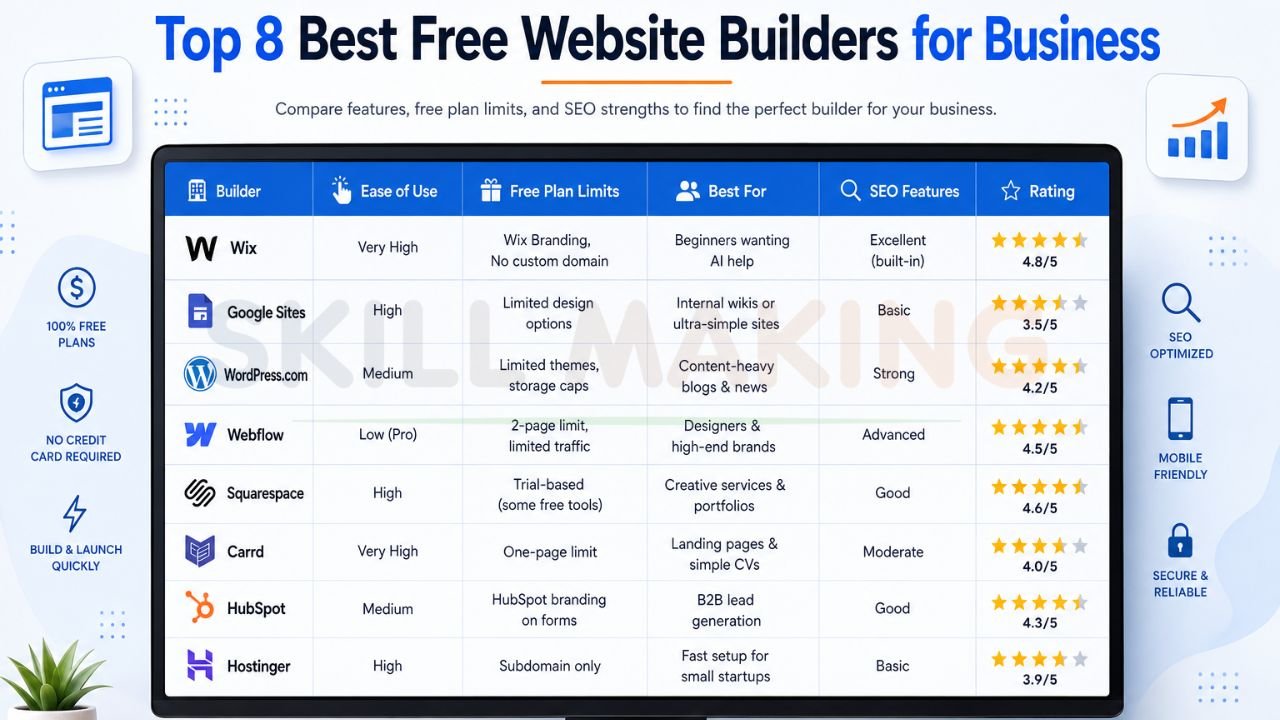
Top 8 Best Free Website Builders for Business (Comparison Table)
| Builder | Ease of Use | Free Plan Limits | Best For | SEO Features | Rating |
|---|---|---|---|---|---|
| Wix | Very High | Wix Branding, No custom domain | Beginners wanting AI help | Excellent (built-in) | 4.8/5 |
| Google Sites | High | Limited design options | Internal wikis or ultra-simple sites | Basic | 3.5/5 |
| WordPress.com | Medium | Limited themes, storage caps | Content-heavy blogs & news | Strong | 4.2/5 |
| Webflow | Low (Pro) | 2-page limit, limited traffic | Designers & high-end brands | Advanced | 4.5/5 |
| Squarespace | High | Trial-based (some free tools) | Creative services & portfolios | Good | 4.6/5 |
| Carrd | Very High | One-page limit | Landing pages & simple CVs | Moderate | 4.0/5 |
| HubSpot | Medium | HubSpot branding on forms | B2B lead generation | Good | 4.3/5 |
| Hostinger | High | Subdomain only | Fast setup for small startups | Basic | 3.9/5 |
How to Create a Professional-Looking Business Website for Free
To make a free site look like it cost thousands, focus on “Usability Heuristics” as researched by the Nielsen Norman Group.
- Consistent Branding: Use a harmonious color scheme and only two professional fonts. Saturated or “silly” fonts like Comic Sans should be avoided unless requested for a specific aesthetic.
- Fast Load Speeds: Compress your images before uploading. A site that takes more than 3 seconds to load loses customers to the next person on Google.
- High-Contrast CTAs: Your “Get a Quote” or “Call Now” buttons should stand out in a color that isn’t used elsewhere on the page.
- Social Proof: Include a section for customer reviews. Even a free site can display text-based testimonials that build trust.
- Clean Navigation: Keep your menu simple. Don’t hide important pages behind too many clicks.
👉 Turn Your Website into a Lead-Generating Machine – 📲 Contact: +917906334941
Special Guide: Creating a Free Website for Construction & Home Improvement Companies
Construction is a visual and trust-based industry. If you are a contractor, your free website builder for contractors approach must emphasize your technical authority and safety records.
- The Portfolio is King: Create a page specifically for “Recent Projects.” Use a before-and-after format. Real photos of Florida homes, for instance, resonate far better than stock images of snowy mountains.
- The “Golden Minute” Response: Integrate a WhatsApp button. In construction, responding within the first minute can increase your closing rate by 80%.
- Local SEO Focus: Mention specific neighborhoods (e.g., “Serving Pine Hills and Downtown Orlando”). This helps you appear in hyper-local searches.
- Service-Specific Pages: Instead of just “Plumbing,” create a section for “Water Heater Repair” or “Emergency Pipe Leaks”.
For more detailed strategies on why some contractor sites fail, read our guide on how to avoid common marketing mistakes construction companies make.
Limitations of Free Business Websites (and When You Should Upgrade)
While you can create free website for small business success, there is always a catch. “Free” usually means you are “renting” your digital presence.
- Unprofessional URLs: A domain like contractorfl.wordpress.com doesn’t inspire the same confidence as contractorfl.com.
- Forced Advertising: The builder may place their own ads on your site, which can distract your customers.
- Limited SEO: Free plans often restrict your ability to edit meta tags or use advanced SEO tools like “Breeze AI” or “Answer Engine Optimization”.
- Slow Speeds: Free hosting is often on “shared” servers with thousands of other sites, leading to sluggish performance.
- No Ownership: If the platform goes under or changes its terms, you could lose your entire site overnight.
When your business starts generating consistent revenue, it is time to move beyond the basics. Get a professional business website built by Skillmaking to ensure you own your assets and maximize your conversion rates.
Common Mistakes When Creating a Free Business Website
Even with free tools, it’s easy to fall into traps that kill your conversion.
- Ghosting Inquiries: If you don’t answer a message within 15 minutes, the customer has already moved to the next business.
- Ignoring Mobile Users: A site that looks broken on an iPhone is a “leaky pipe” for your marketing budget.
- Vague Service Descriptions: Don’t just say “We do construction.” Explain what marketing in the construction industry actually is—it’s about building trust and winning high-margin contracts.
- No Tracking: If you don’t know where your leads are coming from, you are wasting your effort.
👉 Launch Your Business Website Faster with AI – 📞 WhatsApp: +917906334941
How to Turn Your Free Website into a Lead-Generating Machine
To move from a static digital brochure to a “lead-generating machine,” follow these 2026 strategies:
- Hyper-Local Focus: Use city-specific keywords to dominate the “Google Map Pack”.
- Educational Content: Use the HubSpot Blog resources to learn about “Answer Engine Optimization” (AEO)—answering the specific questions your customers are asking AI search engines.
- The “Professional Filter”: Ask potential leads qualifying questions in your forms (e.g., “Are you looking for a budget refresh or a premium finish?”) to weed out price-shoppers.
- Sticky Contact Info: Ensure your phone number is always visible at the top of the screen on mobile.
If you are struggling to get enough inquiries, check out our 30-day plan on how to get more home improvement leads.
How Skillmaking Builds High-Converting Business Websites (Beyond Free Tools)
Skillmaking doesn’t just build “pretty” sites; we build high-performing digital assets designed specifically for the trades and service industries. Businesses that partner with us see:
- 3.8x Average Growth in organic traffic within six months.
- 312% Increase in qualified leads.
- 74% Average Conversion Rate for industry-focused inquiries.
We handle the digital “heavy lifting”—from technical SEO and mobile excellence to Florida-specific content—so you can focus on your craftsmanship.
Frequently Asked Questions (FAQs)
- Can I really create a business website for 100% free?
Yes, platforms like Wix, WordPress.com, and Google Sites offer free tiers that allow you to go live without any payment. However, you will have to use their branding and a subdomain (e.g., yoursite.wixsite.com). - Which is the best free website builder for a small business in 2026?
For most, Wix is the best choice due to its AI-powered “Aria” builder, which handles much of the design and content generation for you. - Do free websites show up on Google?
Yes, they can, but it is much harder. Free sites often lack advanced SEO controls and are hosted on slower servers, which can negatively impact your rankings. - Can I use my own domain name with a free plan?
Almost never. Website builders typically require you to upgrade to a paid plan to connect a custom domain like www.yourbusiness.com. - Is a free website safe?
Reputable platforms like WordPress.com and Wix provide standard security features like SSL encryption and DDoS protection on their free plans. - Can I sell products on a free website?
Most free plans have very limited eCommerce features. You might be able to list items, but you’ll likely need a paid plan to process secure payments. - How long does it take to build a free website?
With modern AI tools, you can have a basic functional site ready in 30 to 60 minutes. - Do I need to know how to code?
No. Tools like Webflow, Wix, and Squarespace are “no-code” platforms designed for visual editing. - Can I move my free website to another provider later?
It depends. While you can export content from WordPress, many builders like Wix are “closed ecosystems,” meaning you might have to rebuild the site if you move. - When should I stop using a free website and hire a professional?
As soon as your business starts generating revenue or when you feel the free site’s limitations (like the lack of a custom domain or slow speed) are preventing you from closing bigger jobs.
Conclusion: Start Winning Your Market Today
Building a successful business in 2026 isn’t just about how well you handle your tools; it’s about how well you handle your digital reputation. A free website is a fantastic starting point to plant your flag in the digital soil. It allows you to build trust, show off your work, and start the flow of local leads without financial risk.
However, a free site is just the foundation. To truly dominate your local market and stop chasing projects, you need a high-converting machine that works for you.
Ready to Scale Your Business?
Stop settling for a basic site that just sits idle. Let Skillmaking build the foundation for your massive growth. We specialize in professional website design and digital marketing that gets results for the trades.
Contact Skillmaking Now:
- WhatsApp: +91-7906334941
- Website: skillmaking.com
- Specialized Service: Professional Website Design for Contractors
Don’t let your competition win just because they have a better website. Let’s get your phone ringing today!
