
Starting a website is a lot like building a house. You have the blueprints (your website design), the furniture (your content), and the address (your domain name). But where does the house actually sit? It needs land. In the digital world, that “land” is your web hosting.
Understanding what are the 4 types of hosting is one of the most critical steps you will take as a small business owner, blogger, or freelancer. If you choose the wrong type, your site might be too slow for visitors, crash during a sale, or cost you way more than it should.
👉 Need Fast & Reliable Hosting for Your Website? 📲 Call/WhatsApp: +917906334941
In this guide, we are going to break down the technical walls and explain hosting in a way that actually makes sense. Whether you are launching a local construction business in Florida or a global blog, by the end of this article, you will know exactly which “land” your digital home needs.
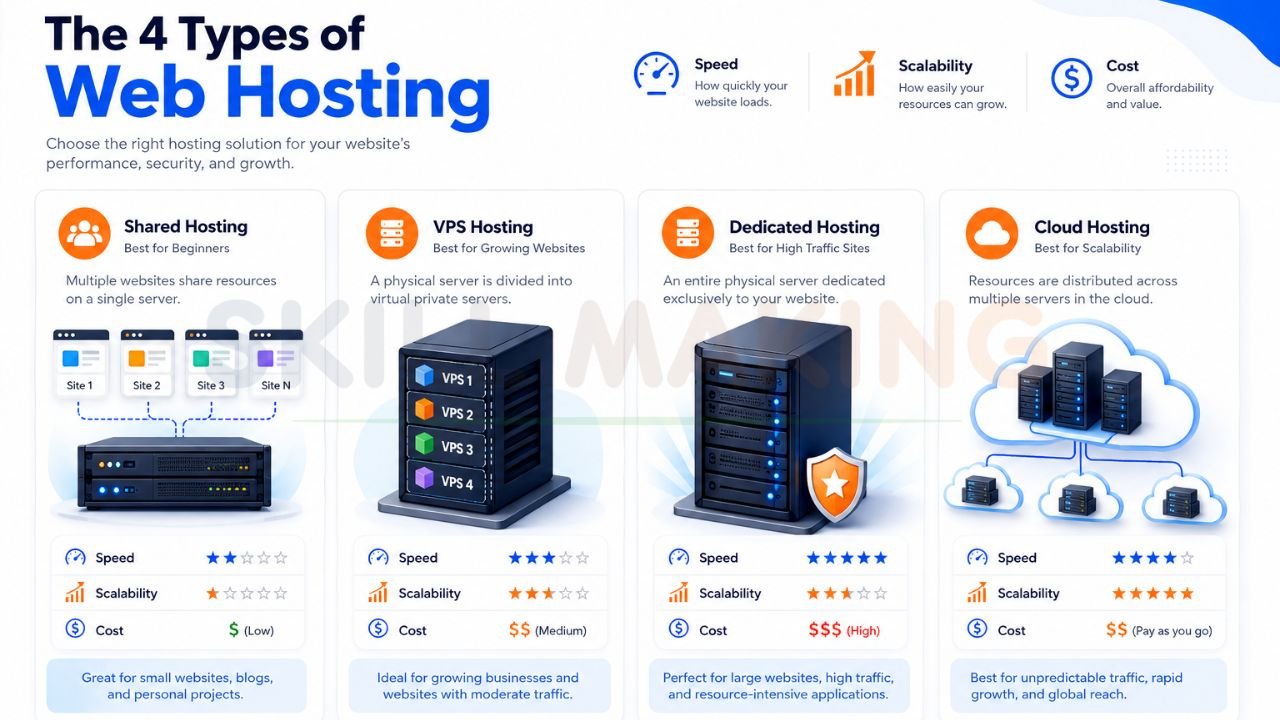
1. Shared Hosting: The “Apartment Building”
Shared hosting is the most common starting point for beginners.
The Analogy
Imagine a large apartment building. Everyone in the building shares the same resources: the water, the electricity, and the hallway space. If your neighbor decides to throw a massive party and uses all the water, your shower pressure might drop.
How It Works
In shared hosting, your website is stored on a server alongside hundreds or even thousands of other websites. All these sites share the server’s CPU, memory (RAM), and disk space. Because the costs are split among so many users, it is incredibly affordable.
- Best For: New bloggers, small personal portfolios, and very small businesses with low traffic.
- Popular Providers: Bluehost, SiteGround, and Namecheap.
👉 Want Help Choosing the Best Hosting Plan? 📞 Call/WhatsApp: +917906334941
2. VPS Hosting: The “Townhouse”
VPS stands for Virtual Private Server. It’s the middle ground between sharing everything and owning the whole building.
The Analogy
Think of a townhouse or a condo. You still share a larger building with neighbors, but you have your own dedicated driveway, your own walls, and your own plumbing. What your neighbor does in their unit generally doesn’t affect your water pressure or electricity.
How It Works
A physical server is divided into several “virtual” servers using special software. Each website on a VPS gets its own dedicated slice of the server’s resources. Even if another site on the same physical machine gets a huge traffic spike, your site stays fast because your resources are reserved just for you.
- Best For: Growing small businesses, e-commerce stores, and sites that need more control and speed than shared hosting can offer.
- Popular Providers: InMotion Hosting and A2 Hosting.
3. Dedicated Hosting: The “Private Mansion”
If you want the ultimate level of power, control, and privacy, dedicated hosting is the answer.
The Analogy
This is like owning a massive private mansion on a large gated estate. You own the land, the house, and every resource on the property. There are no neighbors to worry about. You can paint the walls any color you want, install a 10-car garage, or put in a massive pool without asking anyone for permission.
How It Works
With dedicated hosting, you rent an entire physical server all to yourself. You have total control over the hardware, the operating system, and the security settings. It is the most powerful option but also the most expensive and requires technical knowledge to manage.
- Best For: Large corporations, high-traffic e-commerce sites, and websites with strict security requirements.
- Key Advantage: Unmatched performance and total customization.
4. Cloud Hosting: The “Power Grid”
Cloud hosting is the most modern and flexible type of hosting available today.
The Analogy
Imagine the city’s power grid. When you turn on a light, you draw power from a massive network of power plants. If one plant goes down, the others pick up the slack, and your light stays on. You only pay for the electricity you actually use.
How It Works
Instead of your website living on one single physical machine, it is spread across a “cloud” of multiple connected servers. If one server fails, another one immediately takes over, which means almost zero downtime. It is also incredibly easy to scale; if you have a sudden surge in visitors, the cloud simply pulls more resources from the network to keep your site running smoothly.
- Best For: SaaS companies, rapidly growing startups, and any business that cannot afford a second of downtime.
- Key Feature: Pay-as-you-go pricing and high reliability.
👉 Get Website Hosting, Domain & SEO Setup Services – 📲 Chat Now: +917906334941
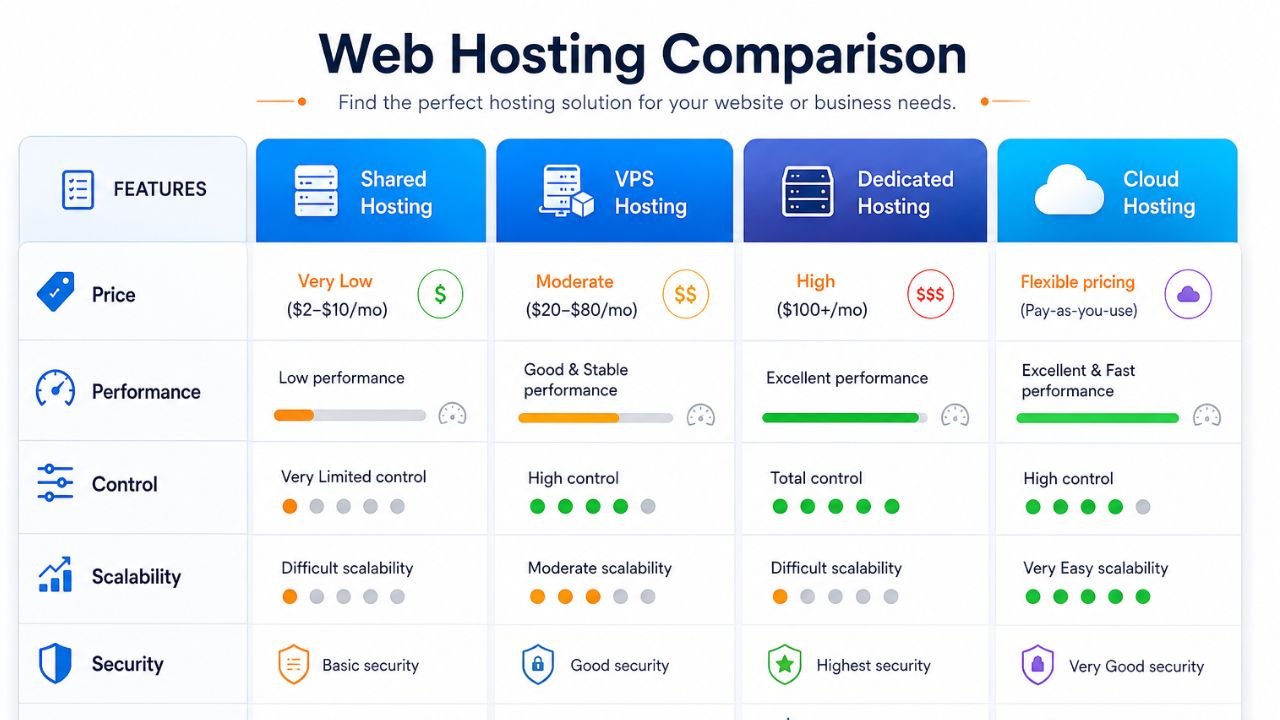
Detailed Comparison Table
| Feature | Shared Hosting | VPS Hosting | Dedicated Hosting | Cloud Hosting |
|---|---|---|---|---|
| Price | Very Low ($2-$10/mo) | Moderate ($20-$80/mo) | High ($100+/mo) | Flexible (Pay-as-you-use) |
| Performance | Low (can be slow) | Good & Stable | Excellent | Excellent & Fast |
| Control | Very Limited | High | Total | High |
| Scalability | Difficult | Moderate | Difficult | Very Easy |
| Security | Basic | Good | Highest | Very Good |
| Best For | Beginners & Blogs | Growing Businesses | Large Enterprises | High-Traffic & Apps |
Pros and Cons of Each Hosting Type
Shared Hosting
- Pros: Extremely budget-friendly; easy to set up for beginners; usually includes a free domain and email.
- Cons: Slower speeds during traffic peaks; limited control over server settings; security risks if a neighbor site is hacked.
VPS Hosting
- Pros: Dedicated resources ensure stable performance; more secure than shared hosting; allows for custom software installations.
- Cons: More expensive than shared; requires a bit more technical knowledge to manage.
Dedicated Hosting
- Pros: Maximum performance and speed; total privacy and high-level security; complete control over everything.
- Cons: Very expensive; requires a professional to manage and maintain.
Cloud Hosting
- Pros: Near-perfect uptime (reliability); scales instantly with traffic spikes; you only pay for what you use.
- Cons: Pricing can be unpredictable month-to-month; can be complex to set up initially.
👉 Launch Your Website Faster with Professional Hosting – 📞 WhatsApp: +917906334941
Which Hosting is Best for Your Business?
Choosing the right “land” depends on what you are building:
- Small Personal Blog: Start with Shared Hosting. It is affordable and gives you everything you need to get your voice out there.
- Local Service Business (e.g., Electrician, Plumber): Shared Hosting or a basic VPS is usually perfect. It keeps your costs low while providing a professional presence.
- Growing E-commerce Store: You need VPS or Cloud Hosting. Speed is money in online sales, and these types ensure your checkout never lags.
- High-Traffic News Site or App: Cloud Hosting is the way to go. Its ability to scale means you won’t crash when a story goes viral.
- Large Enterprise with Sensitive Data: Dedicated Hosting provides the “walls” you need to keep your data truly private.
6 Important Factors to Consider When Choosing Hosting
- Uptime Guarantee: Look for 99.9% or higher. If your site is down, your business is closed.
- Speed (Loading Time): A slow site kills your SEO and frustrates customers. Check for SSD storage and CDN integration.
- Customer Support: Ensure they have 24/7 support via chat or phone. You don’t want to be stuck at 2 AM with a broken site.
- Security Features: Does the plan include a free SSL certificate? Do they offer malware scanning and daily backups?
- Ease of Use: If you aren’t a tech wizard, look for a “one-click” WordPress install and an intuitive dashboard.
- Scalability: Can you easily upgrade your plan as your business grows?
Common Myths About Web Hosting
- Myth 1: “The cheapest hosting is always the best for beginners.”
- Reality: Very cheap hosting often has terrible support and slow speeds, which can hurt your business growth before it even starts.
- Myth 2: “Hosting doesn’t affect my Google ranking.”
- Reality: Google loves fast websites. If your hosting is slow, your SEO will suffer.
- Myth 3: “Unlimited means unlimited.”
- Reality: Most “unlimited” plans have “fair use” policies. If you use too much space, they will ask you to upgrade.
👉 Turn Your Website into a Lead-Generating Machine – 📲 Contact: +917906334941
How Skill Making Helps You Succeed
At Skill Making, we specialize in helping small businesses—especially construction contractors in Florida—navigate the complex world of web design and hosting. We don’t just give you a website; we provide a high-converting digital platform that is mobile-first and SEO-optimized.
Whether you are an electrician in Miami or a roofer in Tampa, we help you:
- Select the perfect hosting type so you never pay for resources you don’t use.
- Design a professional gallery to showcase your best projects.
- Integrate bid forms to capture qualified leads directly from your site.
- Ensure your site is lightning-fast and secure.
Ready to build a website that actually grows your business?
Visit our Professional Website Design Services page to see how we can help you level up your online presence.
Checklist: How to Choose the Best Hosting
- Define your website’s main goal (Blog? Store? Portfolio?).
- Estimate your expected monthly traffic.
- Determine your monthly budget for hosting.
- Check for a Free SSL Certificate (Essential for security).
- Verify 24/7 customer support availability.
- Look for “One-Click” WordPress installation.
- Read reviews about the provider’s actual speed and uptime.
- Confirm that they offer easy automated backups.
Conclusion: Our Practical Recommendation
Choosing between the 4 types of hosting doesn’t have to be overwhelming.
- If you are just starting out: Go with Shared Hosting or Managed WordPress Hosting. It’s affordable, easy, and provides plenty of power for a new site.
- If your business is established and growing: Move to VPS or Cloud Hosting. The added speed and reliability are well worth the investment.
Remember, your hosting is the foundation of your entire online business. Don’t build your dream on shaky ground.
Get Expert Help Today!
Still not sure which type is right for you? Let the experts at Skill Making handle the technical details while you focus on running your business.
- Explore our services: Skill Making Website Design
- Need a quick answer? Message us directly on WhatsApp at +91-7906334941 for a free consultation.
We’re here to help you build something great!
