
Imagine you’ve just built a stunning, high-performance sports car. The paint is flawless, the interior is luxurious, and it looks like it could win any race. But when you look under the hood, you find the engine of a lawnmower. No matter how beautiful the car is, it will never perform the way it was intended to.
In the digital world, your WordPress website is the car, and your server configuration is the engine. When people ask, “What is server configuration needed for WordPress?“, they aren’t just asking for a list of technical specs. They are asking how to build a digital site office that is fast, reliable, and secure enough to handle the 2026 marketplace.
By 2026, user expectations have reached an all-time high. If your website takes more than 3 seconds to load, you could lose over 50% of your potential traffic. Furthermore, between 70% and 80% of local searches now happen on mobile devices, meaning your server must be optimized for speed even on weak cellular signals. Proper server configuration ensures that your site stays online, keeps hackers at bay, and provides a seamless experience for every visitor.
Minimum vs. Recommended Server Requirements for WordPress
To run WordPress, you can get away with very basic settings, but “getting away with it” isn’t a strategy for growth. There is a massive difference between the bare minimum needed to turn the lights on and the recommended configuration required to dominate your market.
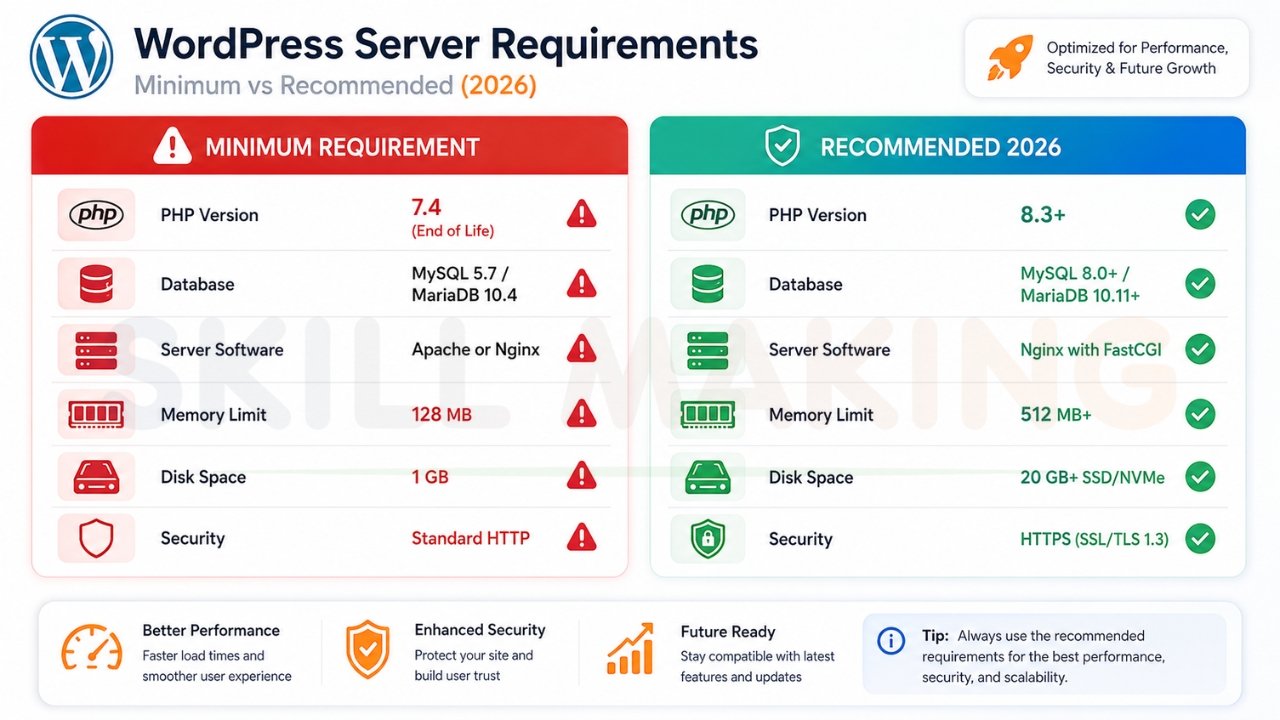
Core Requirements Comparison
| Feature | Minimum Requirement | Recommended (2026 Standard) |
|---|---|---|
| PHP Version | 7.4 (End of Life) | 8.3 or Higher |
| Database | MySQL 5.7 or MariaDB 10.4 | MySQL 8.0+ or MariaDB 10.11+ |
| Server Software | Apache or Nginx | Nginx with FastCGI |
| Memory Limit | 128 MB | 512 MB or Higher |
| Disk Space | 1 GB | 20 GB+ (SSD/NVMe) |
| Security | Standard HTTP | HTTPS (SSL/TLS 1.3) |
While WordPress technically still supports older versions of PHP, using them is like leaving your front door unlocked. Modern versions are not only more secure but significantly faster. For the best results, we always suggest following the official WordPress.org requirements.
Essential Server Configuration Settings for Optimal WordPress Performance
The “Back Office” of your server needs specific settings to ensure WordPress can handle large images, complex plugins, and high traffic without crashing.
PHP Settings (The “Fuel” for Your Engine)
Your PHP settings determine how much “work” your server can do at once. If these are too low, you’ll see the dreaded “Internal Server Error”.
- memory_limit: Set this to at least 512M. This gives your themes and plugins enough room to breathe.
- max_execution_time: Set to 300. This ensures complex tasks (like updating a large plugin) don’t time out.
- upload_max_filesize: Set to 64M or 128M. This allows you to upload high-quality project photos without errors.
- post_max_size: Should be equal to or slightly larger than your upload size.
Database Optimization
Your database is where all your text, comments, and settings live. In 2026, we recommend using MariaDB over standard MySQL because it offers better performance for high-traffic sites.
Key Server Technologies Explained Simply
Technical jargon can be scary, so let’s break down the “Big Three” technologies that power a professional WordPress environment.
PHP (The Brains)
PHP is the programming language that makes WordPress work. In 2026, PHP 8.3 is the standard. It is twice as fast as version 7.2, meaning your pages will load much quicker for users on smartphones.
Nginx vs. Apache (The Traffic Cop)
This is the software that receives a request from a user’s browser and sends them your website files.
- Apache is the old reliable. It is flexible and easy to use.
- Nginx is the modern speedster. It is designed to handle thousands of simultaneous visitors with very little memory usage.
Our Verdict: For 2026, Nginx is the winner for performance-driven sites.
MariaDB / MySQL (The Filing Cabinet)
This is where your content is stored. MariaDB is often preferred by experts because it is “open-source” and generally faster at retrieving data than standard MySQL. You can learn more about these differences on the official MariaDB site.
Best Hosting Types for WordPress
Not all “land” on the internet is created equal. Where you choose to host your site depends on your budget and your growth goals.
- Shared Hosting: You share a server with hundreds of other sites. It’s cheap ($5-$10/mo), but if your neighbor gets a lot of traffic, your site will slow down.
- VPS (Virtual Private Server): You have your own dedicated slice of a server. This is much more stable and is the minimum we recommend for a growing business.
- Cloud Hosting: Your site lives on a network of servers. It is incredibly fast and can “scale up” instantly if you suddenly get thousands of visitors.
- Managed WordPress Hosting: The hosting company handles all the technical server configuration for you. This is the “hands-off” choice for business owners who want to focus on their work.
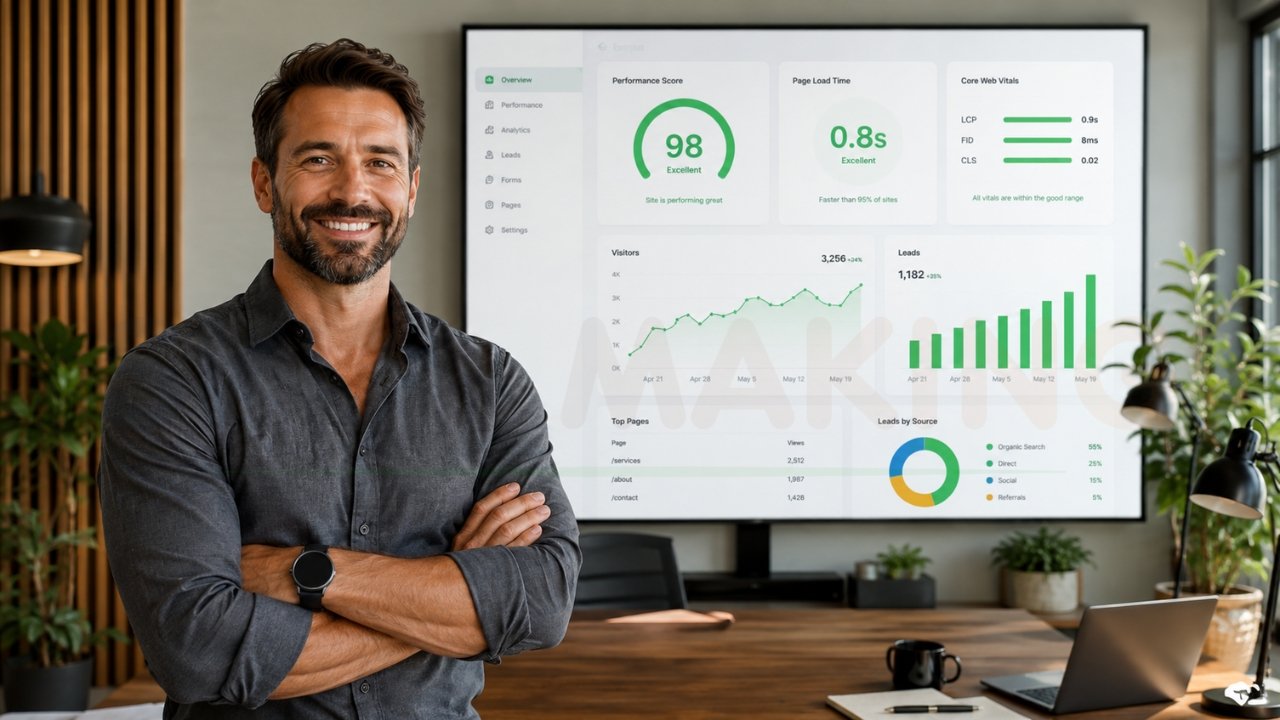
Important Server Optimizations for 2026
Once you have your basic setup, you need to add the “turbochargers” that make your site truly fly.
Caching (The “Shortcut”)
Instead of building your webpage from scratch every time a visitor clicks, caching saves a “picture” of the page and shows it instantly.
- Page Caching: Saves the whole page.
- Object Caching (Redis/Memcached): Speeds up the database requests.
GZIP Compression
This “shrinks” your website files before they are sent to a visitor’s phone, making the download much faster.
HTTP/2 and HTTP/3
These are modern protocols that allow the server to send multiple files (like images, CSS, and JS) to the browser at the same time, rather than one by one.
SSL (HTTPS)
This is mandatory in 2026. Without an SSL certificate (the little padlock), Google will mark your site as “Not Secure,” destroying your reputation.
Security Configuration Every WordPress Site Needs
A fast site is useless if it gets hacked. Your server needs “digital guards” to keep you safe.
- Isolation: If you are on a VPS, ensure your account is isolated. This means if another site on the same physical hardware gets a virus, it can’t jump to yours.
- Web Application Firewall (WAF): This acts as a shield, blocking bad bots and hackers before they even reach your login page.
- Automated Backups: Your server should take a “snapshot” of your site every 24 hours. If something breaks, you can click a button and be back online in minutes.
- SFTP over FTP: Always use SFTP (Secure File Transfer Protocol) to upload files. It encrypts your password so hackers can’t steal it.
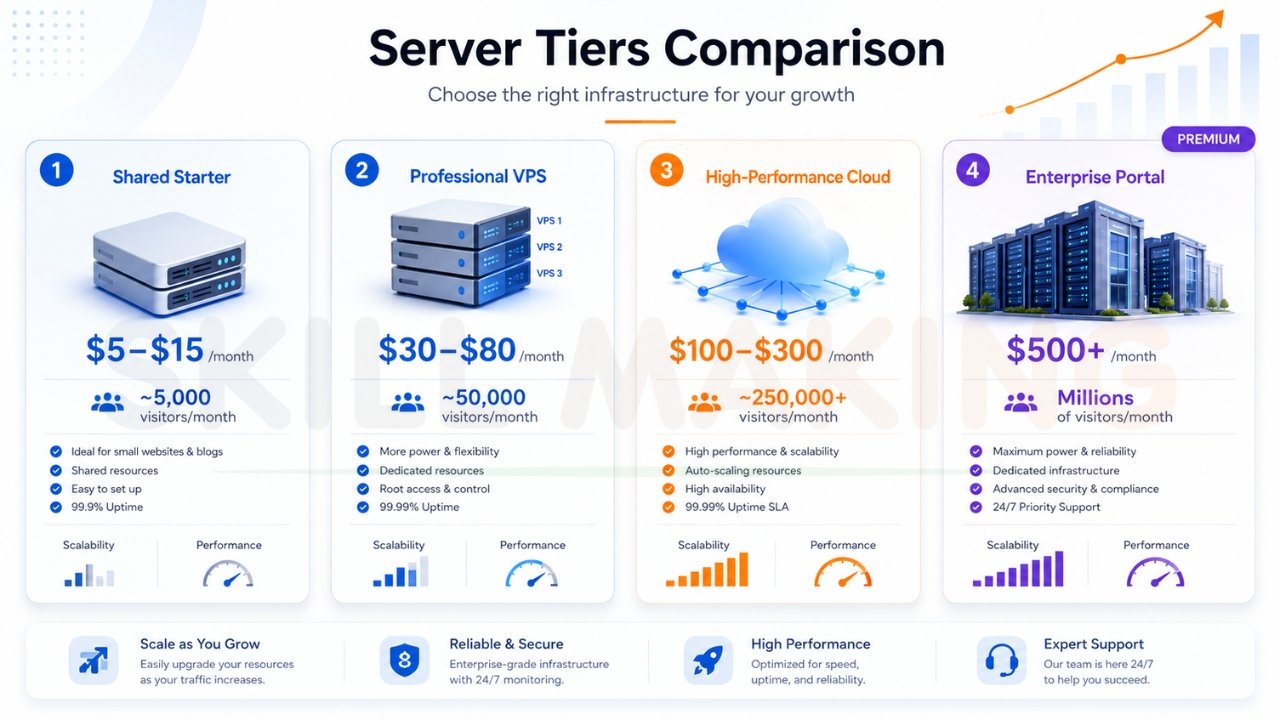
How Much Traffic Your Server Can Handle?
Business owners often ask, “Will my server crash if I get too many visitors?” Here is a realistic benchmark for different configurations in 2026.
| Server Tier | Typical Monthly Cost | Estimated Safe Traffic |
|---|---|---|
| Shared Starter | $5 – $15 | ~5,000 visitors/month |
| Professional VPS | $30 – $80 | ~50,000 visitors/month |
| High-Performance Cloud | $100 – $300 | ~250,000+ visitors/month |
| Enterprise Portal | $500+ | Millions of visitors/month |
If you are a local contractor in Florida, a high-quality VPS or Managed Cloud setup is usually more than enough to dominate your local market.
Common Server Configuration Mistakes and How to Fix Them
Arre bhai, even the best intentions can lead to slow sites. Here are the most common “leaky pipes” we see in server setups.
- Ignoring Updates: Running an old version of PHP is the #1 reason for site hacks. Fix: Check your hosting dashboard and upgrade to PHP 8.3.
- Plugin Bloat: Installing 40+ plugins slows down your server’s “brain”. Fix: Delete any plugin you haven’t used in the last 30 days.
- No Image Optimization: Uploading 5MB photos from your iPhone will kill your speed. Fix: Use a plugin or server-side tool to compress images.
- Cheap Hosting: You get what you pay for. A $2 hosting plan will never provide a $2,000-a-month lead generation experience.
How Skill Making Helps with Optimized WordPress Websites?
At Skill Making, we don’t just build “pretty” websites; we engineer lead-generation machines. We understand that as a small business owner, you don’t have time to worry about “Nginx configurations” or “PHP memory limits.” You have a craft to master and a business to run.
Our clients see massive, measurable results because we handle the digital “heavy lifting” for them:
- 3.8x Average Growth in organic traffic within just six months.
- 312% Increase in qualified lead requests.
- 74% Lead Conversion Rate driven by high-speed performance and trust-based design.
Whether you need a new site or want to optimize your current one, our Professional Website Design Services are built on the exact 2026 server standards discussed in this guide. We ensure your site loads in under 2 seconds, stays secure, and ranks at the top of Google.
Checklist: Ideal Server Configuration for WordPress in 2026
Before you go live, walk through this checklist to ensure your “engine” is ready for the race:
- PHP Version: Is it 8.3 or higher?
- Memory Limit: Is it set to 512M?
- Database: Are you using MariaDB 10.11+?
- HTTPS: Is your SSL certificate active and forcing HTTPS?
- Caching: Do you have both Page and Object caching enabled?
- Security: Is a Web Application Firewall (WAF) active?
- Backups: Are daily automated backups configured?
- Image Compression: Is GZIP or Brotli compression enabled?
Conclusion: Your Next Steps Toward a Faster Website
Proper server configuration is the difference between a website that sits idle and one that rings your phone with new jobs every day. You now know what is server configuration needed for WordPress to thrive in 2026—from high-performance PHP versions to the security of a managed cloud environment.
Don’t let your craftsmanship be hidden by a slow, outdated server. Whether you are a plumber in Tampa or a consultant in Mumbai, your digital presence should reflect your professional excellence.
Ready to 10x your bookings without the technical stress?
Stop guessing and start growing. Let the experts at Skill Making build or optimize your WordPress site into a high-converting 24/7 sales machine.
- Explore our services: Website Design & Optimization
- WhatsApp Us Now: +91-7906334941
- Visit Us: skillmaking.com
Let’s build your digital future together today!
