
Imagine a homeowner in Miami standing in their kitchen at 9:00 PM, looking at a leaking faucet. They don’t check the Yellow Pages; they pull out their smartphone and search for the “best plumber near me”. If your business doesn’t appear in those search results with a professional, fast, and trustworthy site, you are invisible to 90% of your local market. In 2026, learning how to create a website for business is no longer a technical option—it is a survival requirement for every small business owner.
Research shows that approximately 75% of users judge a company’s credibility based solely on its website design. Furthermore, businesses that lack a professional digital presence lose up to 60% of potential leads who perform “digital due diligence” before making a purchase. Whether you are a general contractor, a luxury florist, or a local consultant, this guide will walk you through the best way to make a business website that doesn’t just look pretty but actually generates revenue.
👉 Need a Professional Website for Your Business? 📲 Call/WhatsApp: +917906334941
Why Every Business Needs a Professional Website in 2026
The digital landscape has shifted. In 2026, social media platforms like Facebook and Instagram are excellent for engagement, but they are “rented land.” Algorithms change, accounts can be suspended, and you don’t own the data. A professional business website is a digital asset you own and control completely.
- Instant Credibility: A polished site proves you are a legitimate entity, especially in industries like construction where homeowners fear unlicensed “handymen”.
- 24/7 Sales Representation: Your website is your digital showroom, working to capture “hot” leads even while you are asleep or busy on a job site.
- Search Engine Dominance: Without a website, you cannot rank for high-intent local keywords that drive ready-to-hire clients to your business.
- Ownership of Data: You can track visitor behavior through tools like Google Analytics to understand exactly what your customers are looking for.
Pro Tip: Let Skillmaking create a professional business website for you and secure your company’s future in the digital-first economy.
Planning Your Business Website (Goals, Target Audience, Branding)
Before you write a single line of code or pick a template, you must build a strategic foundation. A website without a plan is just a “digital brochure” that sits idle.
Define Your Primary Goals
What is the #1 thing you want a visitor to do?
- Lead Generation: Filling out a “Get a Quote” form.
- Direct Calls: Clicking a “Call Now” button on their phone.
- Information: Reading about your specific certifications and safety records.
Identify Your Target Audience
Are you targeting luxury homeowners in Coral Gables or commercial property managers in downtown Tampa?. Understanding what is marketing in the construction industry—which is building trust through expertise—will help you tailor your content to your “dream” clients.
Establish Your Digital Branding
Your website should be a reflection of your physical craftsmanship. This includes a high-resolution logo, a consistent color palette, and professional project photography.
👉 Want a Website That Generates Leads & Customers? 📞 Call/WhatsApp: +917906334941
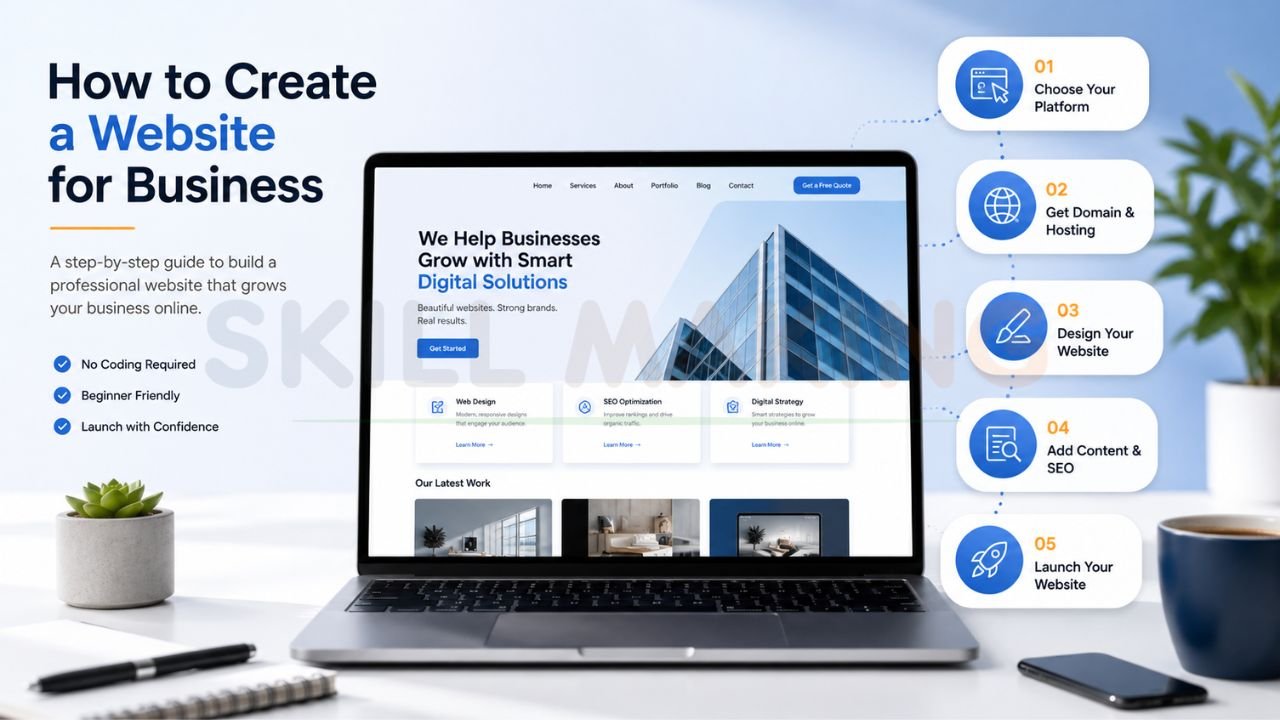
Step-by-Step: How to Create a Website for Business (Detailed Guide)
If you are wondering how to build a website for small business, follow these six essential steps to move from “Invisible” to “Industry Leader”.
Step 1: Secure Your Domain Name
Your domain is your digital address (e.g., www.yourbusiness.com). Keep it short, memorable, and relevant to your brand. The Small Business Administration (SBA) recommends registering your name officially to protect your legal business identity.
Step 2: Choose Reliable Hosting
Hosting is the “plot of land” where your website lives. In 2026, speed is non-negotiable. If your host is slow and your site takes more than 3 seconds to load, you will lose more than half of your potential traffic.
Step 3: Select Your Platform
Decide whether you want to use a DIY builder like Wix, the industry-standard WordPress.org, or a fully custom-coded solution.
Step 4: Design the User Experience (UX)
Focus on “Frictionless UI/UX.” According to the Nielsen Norman Group, users should never be more than one click away from contacting you. Ensure the navigation is intuitive and the layout is clean.
Step 5: Create High-Converting Content
Don’t just use generic stock photos. Upload high-resolution galleries of your actual work in local homes. Use “intent-based” keywords to ensure Google for Small Business can find and index your pages correctly.
Step 6: Optimize for SEO and Launch
Before going live, verify that your site is mobile-friendly and that your Google Business Profile is integrated.Ready to grow? Get a custom business website designed by experts at Skillmaking and turn your online presence into a lead-generating machine.
👉 Get Website Design, SEO & Google Ads Services – 📲 Chat Now: +917906334941
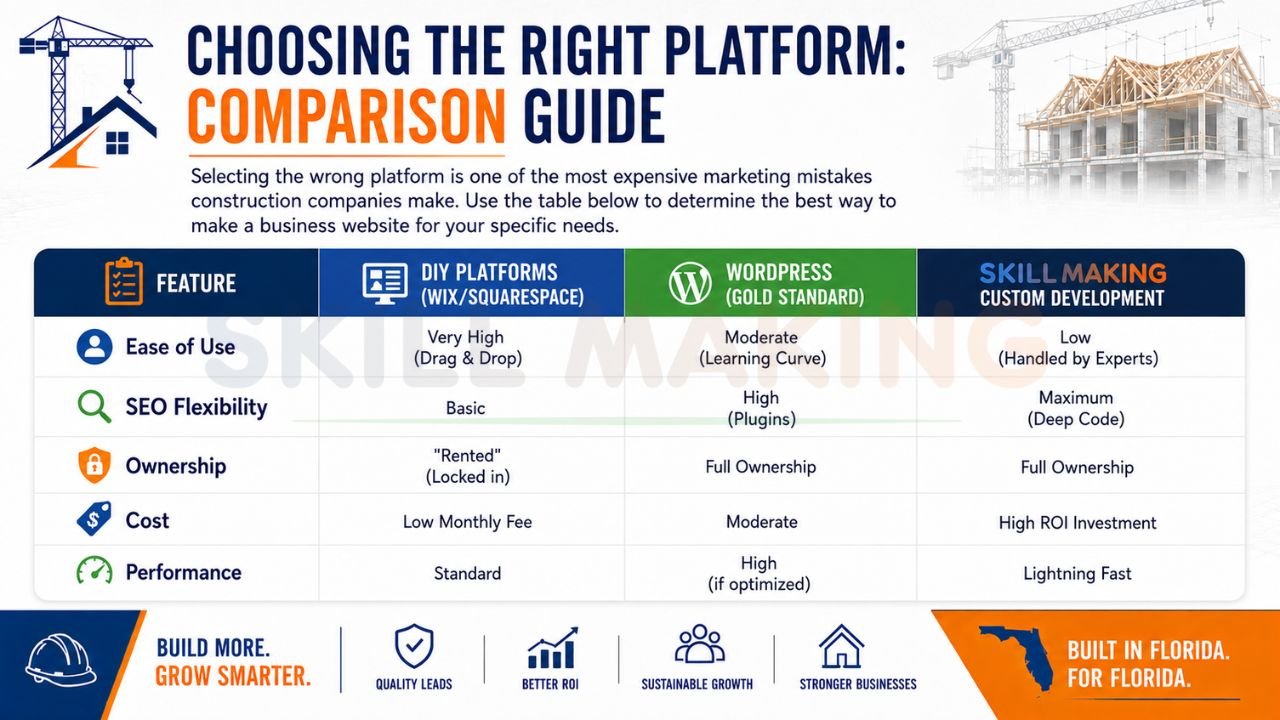
Choosing the Right Platform: Comparison Guide
Selecting the wrong platform is one of the most expensive marketing mistakes construction companies make. Use the table below to determine the best way to make a business website for your specific needs.
| Feature | DIY Platforms (Wix/Squarespace) | WordPress (Gold Standard) | Custom Development (Skillmaking) |
|---|---|---|---|
| Ease of Use | Very High (Drag & Drop) | Moderate (Learning Curve) | Low (Handled by Experts) |
| SEO Flexibility | Basic | High (Plugins) | Maximum (Deep Code) |
| Ownership | “Rented” (Locked in) | Full Ownership | Full Ownership |
| Cost | Low Monthly Fee | Moderate | High ROI Investment |
| Performance | Standard | High (if optimized) | Lightning Fast |
Essential Pages Every Business Website Must Have
To be a complete business website creation guide, we must highlight the pages that build the most trust.
- Homepage: Your digital storefront. It must clearly state who you are, what you do, and how to contact you within 5 seconds.
- Services Pages: Don’t group everything. Create dedicated pages for “Kitchen Remodeling,” “HVAC Repair,” or “Emergency Plumbing” to rank for specific local searches.
- Portfolio / Gallery: Visual proof of your craftsmanship. Use “before and after” sliders for maximum impact.
- Testimonials / Reviews: Social proof from verified local clients.
- Contact Us: Feature a “Get a Free Quote” form and a direct WhatsApp integration.
Special Guide: Creating a Website for Construction & Home Improvement Businesses
Construction is a high-risk industry with long sales cycles. Clients don’t buy a $50,000 renovation on a whim; they conduct intense research. If you are looking for how to get more home improvement leads, your website must serve as a bridge between your technical expertise and your reputation.
Key Requirements for Contractors:
- Mobile-First Design: Over 80% of Florida leads search for services on their smartphones while at a job site or on the go.
- Safety and Compliance: Proudly display your OSHA certifications and state licenses to reassure commercial clients.
- Instant Communication: Use WhatsApp buttons to allow leads to send photos of their project for an instant estimate.
Design, SEO, Mobile Optimization & Lead Generation Best Practices
A “pretty” website that nobody can find is useless. You must follow the Moz Beginner’s Guide to SEO to ensure you rank for local keywords.
- Mobile Excellence: In 2026, mobile responsiveness is the global standard. A site that isn’t mobile-friendly is effectively broken.
- Local SEO Mastery: Target city-specific keywords like “best roofing contractor in Tampa” to appear in the Google “Map Pack”.
- Fast Loading Speeds: Large, unoptimized project photos are a “leaky pipe” for your marketing. Optimize every image for speed.
- Call-to-Action (CTA) Placement: Never leave a user wondering what to do next. Every page should end with a clear instruction, like “Call for a Consultation”.
👉 Launch Your Business Website Faster – 📞 WhatsApp: +917906334941
Common Mistakes to Avoid When Creating a Business Website
Avoid these pitfalls identified by Search Engine Journal that deter 70% of potential visitors.
- Ghosting Inquiries: If you don’t respond to a digital lead within the “Golden Minute” (60 seconds), they have likely already called your competitor.
- Using Generic Stock Photos: Homeowners want to see your work in their neighborhoods, not a studio image from a different country.
- Ignoring SEO: Relying solely on word-of-mouth is a slow strategy. In 2026, word-of-mouth happens on Google Reviews.
- No Performance Tracking: Without tools like HubSpot or Google Analytics, you won’t know which pages are actually generating money.
How Much Does It Cost to Create a Business Website?
Investing in a professional platform is a high-ROI decision. While DIY options seem cheap, the “hidden costs” of poor performance can be devastating.
| Website Type | Estimated Cost (2026) | Best For |
|---|---|---|
| Starter Site | $1,500 – $3,000 | Individual Subcontractors |
| Professional Corporate Site | $3,500 – $7,500 | Mid-sized Contracting Firms |
| Premium Developer Portal | $8,000 – $15,000+ | Large Developers & Agencies |
Think about the ROI: For a Florida plumber, a $6,000 website pays for itself after just 12 new customers. Every job after that is pure profit driven by your digital asset.
How Skillmaking Creates High-Converting Business Websites
At Skillmaking, we don’t just build “pretty” websites; we build lead-generation machines. Our specialized 5-step process ensures your digital storefront is open for business 24/7.
- Market Analysis: We identify the “missing circuits” in your current strategy based on your specific service area.
- Frictionless UI/UX: We design so users are never more than one click away from calling you.
- Technical Development: We use lightning-fast frameworks for instant loading, even on weak cell signals.
- Conversion Setup: We integrate WhatsApp, custom bid forms, and call tracking.
- Local SEO Dominance: We optimize your content to rank for high-value keywords in your local Florida market.
Our clients have seen an average 3.8x growth in organic traffic and a 312% increase in qualified leads over a six-month period.
👉 Turn Your Website into a Lead-Generating Machine – 📲 Contact: +917906334941
Frequently Asked Questions (FAQs)
- Can’t I just use social media instead of a website?
Social media is for engagement, but a website is your digital property where you control all the data and design. - How long does it take to see SEO results?
While technical setup is fast, organic growth typically takes 3-6 months to mature. - Is a DIY website builder good enough for my business?
DIY platforms often lack the deep “under-the-hood” technical optimization required for high search rankings. - How often should I update my web design?
Most businesses should refresh their site every 2–3 years to keep up with evolving technology and security standards. - Do I really need a “mobile-first” site in 2026?
Yes. Over 80% of local service searches happen on smartphones. - What is the average cost of a professional marketing website?
A high-quality, lead-generating platform typically ranges between $5,000 and $10,000. - Can a website help me find better employees?
Absolutely. A professional site makes your company look like a stable, high-quality place to work, attracting skilled labor. - How do I track if my website is actually working?
We integrate Google Analytics and call tracking so you can see exactly which marketing dollars are turning into jobs. - What is the “Golden Minute” rule?
It means you must reply to a digital inquiry within 60 seconds to maximize your chance of closing the deal. - Do I own my website once it’s paid for?
With Skillmaking, yes. You own the domain and all files, ensuring you are never “locked in” to a proprietary system.
Conclusion: Start Building Your Digital Future Today
In 2026, your website is your most valuable business asset. It is the bridge between your physical craftsmanship and a multi-trillion dollar market. Whether you are a general contractor in Miami or a custom home builder in Tampa, a professional, fast, and SEO-optimized website is what will set you apart from the competition.
Don’t let high-value projects go to your competitors. Take the first step toward a booked-out calendar and a powerful brand today.
Contact Skillmaking Today:
- Let Skillmaking create a professional business website for you: skillmaking.com/website-design/
- WhatsApp Us Now: +91-7906334941
- Specialized Service: Professional Website Design for Contractors
