
Hello there! If you’ve ever felt overwhelmed by the thought of building a website, you are in exactly the right place. I’m so glad you’re here. Think of me as your patient guide, ready to walk you through the digital woods until we reach your beautiful new “online home.”
In 2026, building a website is no longer about just “having an online presence”; it is about creating a high-performance, lead-generating engine. Whether you are a small business owner wiring luxury homes in Miami or a freelancer starting a blog, WordPress is your best friend. It powers over 40% of the internet because it is flexible, powerful, and, once you understand the basics, surprisingly friendly.
👉 Start Your WordPress Website Journey with a Professional, High-Converting Design – 📲 WhatsApp Us Today
In this guide, we will explore exactly how does WordPress work for beginners without using scary technical jargon. By the time you finish reading, you’ll have the confidence to start your own digital journey.
1. How WordPress Actually Works (Explained Like You’re 5)?
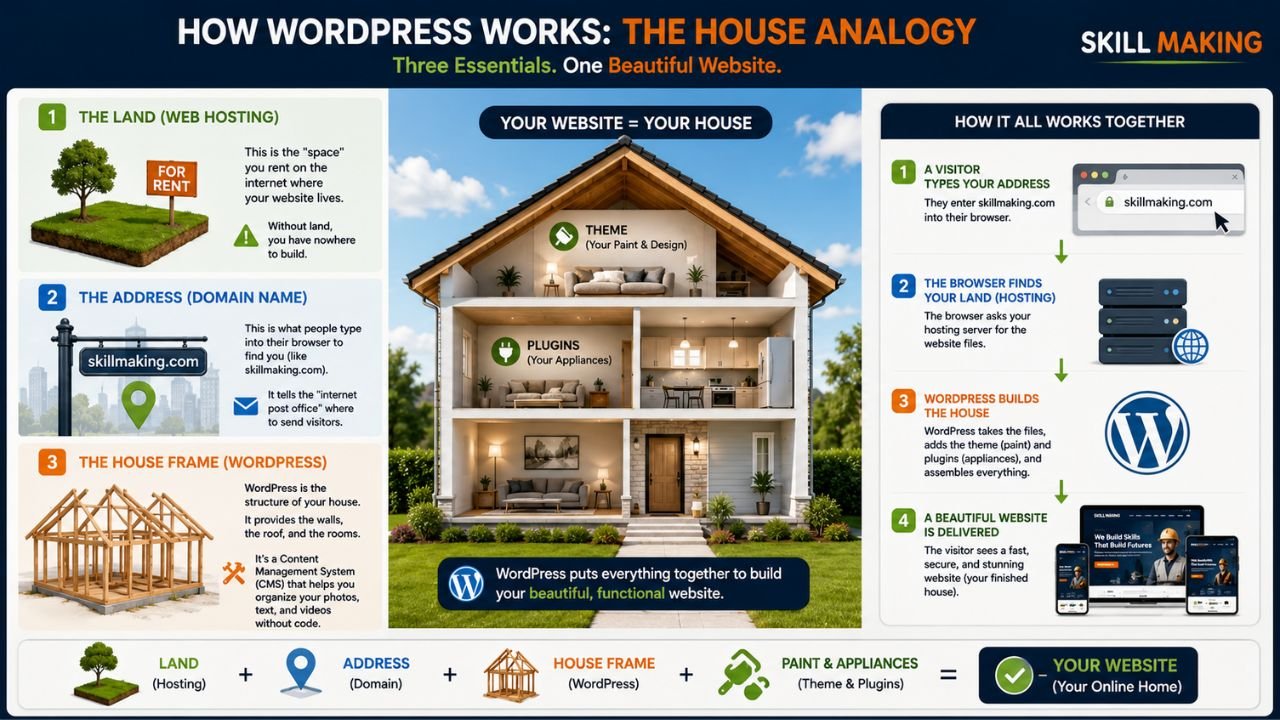
Let’s use a simple analogy. Imagine you want to build a physical shop or a house. To do that, you need three main things:
👉 Build a Beginner-Friendly WordPress Website That Brings Real Leads & Customers – 📲 Start Chat Now
- The Land (Web Hosting): This is the “space” you rent on the internet where your website lives. Without land, you have nowhere to build.
- The Address (Domain Name): This is what people type into their browser to find you (like skillmaking.com). It tells the “internet post office” where to send visitors.
- The House Frame (WordPress): WordPress is the structure of your house. It provides the walls, the roof, and the rooms. It’s a “Content Management System” (CMS), which is just a fancy way of saying it’s a tool that helps you organize your photos, text, and videos without needing to write code.
When a visitor types your address into their phone, their browser asks your “land” (hosting) for the files. WordPress then quickly puts those files together—your “paint” (theme) and “appliances” (plugins)—to show them a beautiful, finished room (your webpage).
2. WordPress.com vs. WordPress.org – Which One Should Beginners Choose?
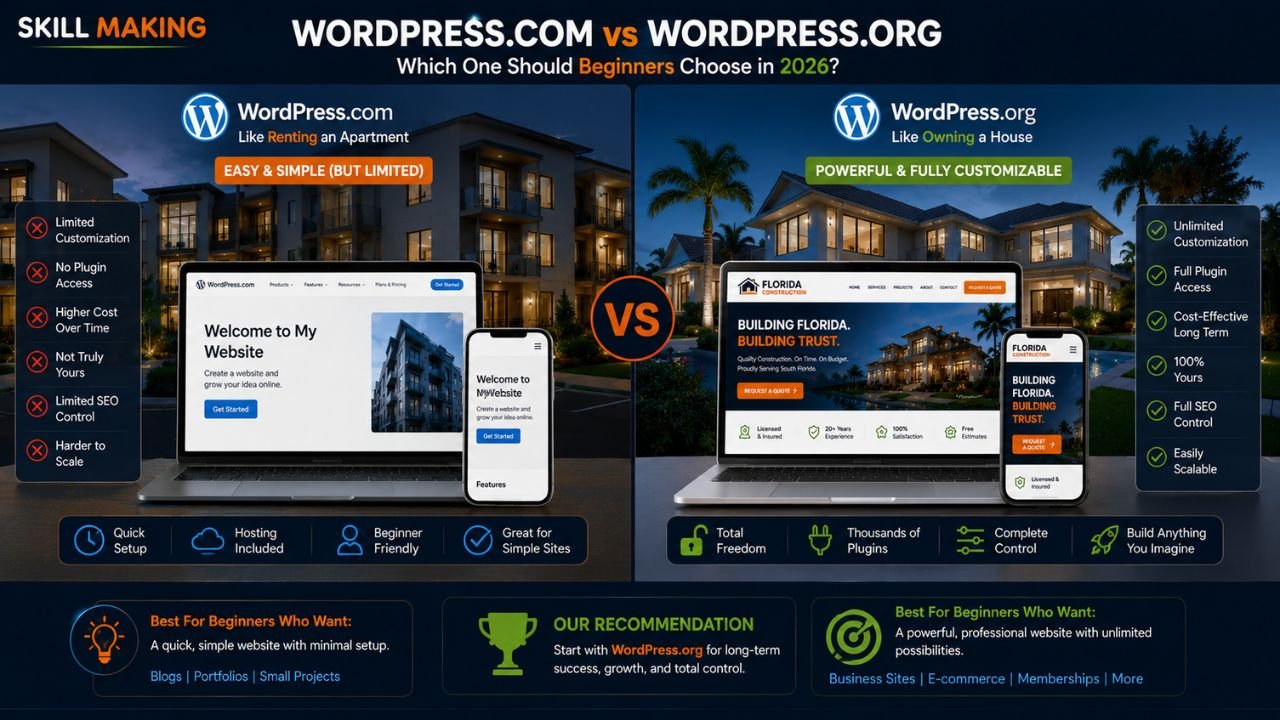
This is the most common point of confusion for beginners. Think of it like Renting an Apartment vs. Owning a House.
👉 Get a Mobile-First WordPress Website Optimized for SEO & Business Growth – 📲 Contact Us on WhatsApp
| Feature | WordPress.com (The Rental) | WordPress.org (The Owned House) |
|---|---|---|
| Setup | Very easy; they handle everything. | Requires you to find your own hosting. |
| Control | Limited. You must follow their rules. | 100% control. You own your files and data. |
| Customization | Restricted unless you pay for expensive plans. | Infinite. Use any theme or plugin you want. |
| Growth | Harder to scale for a serious business. | Best for businesses looking to dominate their market. |
Our Recommendation: For absolute beginners who want a professional business site, WordPress.org (the “self-hosted” version) is the winner. It gives you the freedom to grow and ensures you truly own your digital asset.
3. Step-by-Step: How to Set Up WordPress for the First Time
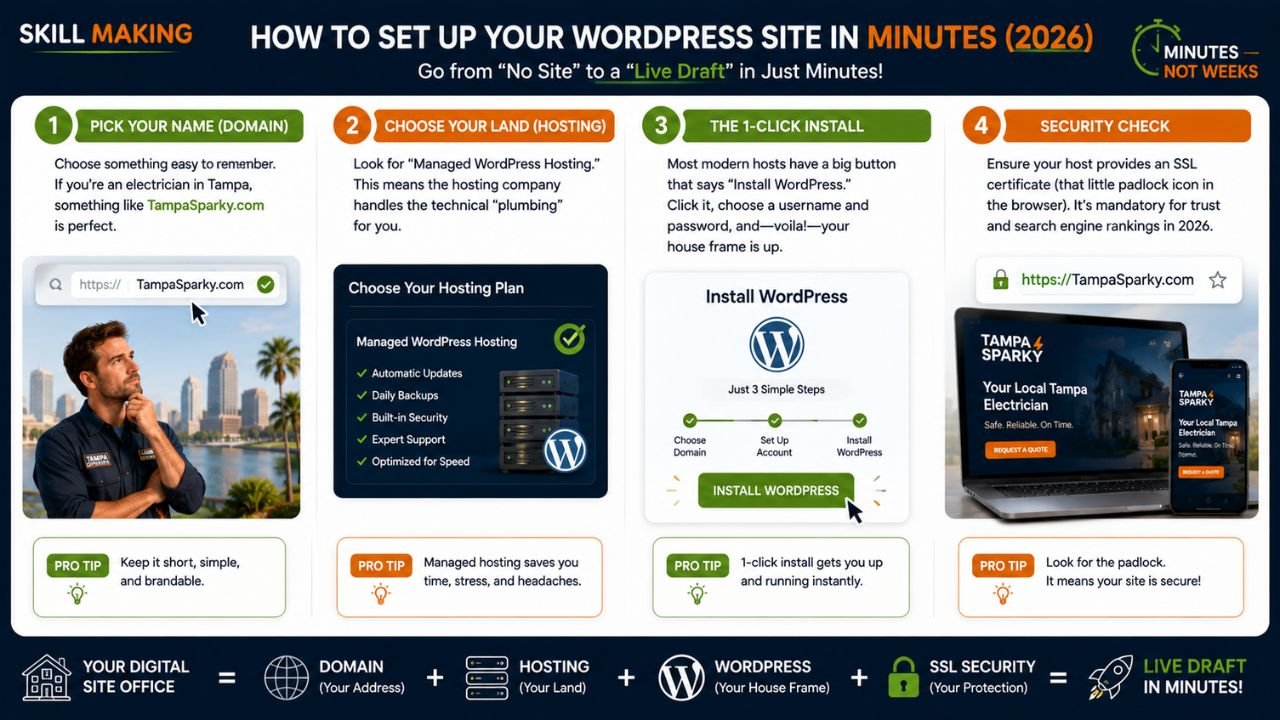
Setting up your “digital site office” doesn’t have to take weeks. In 2026, you can go from “no site” to a “live draft” in minutes.
👉 Stop Struggling with DIY WordPress Setup & Launch Your Website the Right Way – 📲 Message Us Today
- Pick Your Name (Domain): Choose something easy to remember. If you’re an electrician in Tampa, something like TampaSparky.com is perfect.
- Choose Your Land (Hosting): Look for “Managed WordPress Hosting.” This means the hosting company handles the technical “plumbing” for you.
- The 1-Click Install: Most modern hosts have a big button that says “Install WordPress.” Click it, choose a username and password, and—voila!—your house frame is up.
- Security Check: Ensure your host provides an SSL certificate (that little padlock icon in the browser). It’s mandatory for trust and search engine rankings in 2026.
4. Understanding the WordPress Dashboard
When you log in to your website (usually at yourwebsite.com/wp-admin), you’ll see the Dashboard. Think of this as the “Back Office” of your shop where customers aren’t allowed, but where all the magic happens.
- Posts: Where you write your news or blog articles. These are “dynamic” and appear in chronological order.
- Pages: These are for “static” content that doesn’t change much, like your “About Us” or “Contact” page.
- Media: The library where all your beautiful project photos and videos live.
- Appearance: This is your “Interior Design” department. Here you can change your “paint” (Themes) and menus.
- Plugins: Think of these as “Apps” for your website. Want a WhatsApp button? There’s a plugin for that!.
- Settings: The “Control Panel” where you set your site’s name and time zone.
5. Key Concepts Every Beginner Must Know
To truly master how to use WordPress step by step, you need to know these four pillars:
Themes (The Look)
A theme is a collection of files that determine the visual design of your site. In 2026, AI-driven themes are natively responsive, meaning they automatically look great on a smartphone—a non-negotiable factor today.
Plugins (The Function)
Plugins add new features. Just like adding a dishwasher to your kitchen, a plugin can add a booking system, a contact form, or a “Hurricane Readiness Checklist” to your site.
Blocks (The Building Bricks)
WordPress uses a “Block Editor.” Every paragraph, image, or button is a “block” that you can drag and drop. It’s like playing with digital Legos!
Widgets (The Extras)
Widgets are small blocks that perform specific functions, usually in your “Sidebar” or “Footer” (the very bottom of your site), like a search bar or a list of your recent projects.
👉 Turn Your WordPress Website into a 24/7 Lead Generation Machine – 📲 Connect on WhatsApp
6. How to Create Your First Page and Blog Post?
Ready to start building? Let’s do this together!
Creating a Page (e.g., “Our Services”)
- Go to Pages > Add New.
- Give it a title (e.g., “Electrical Repairs in Miami”).
- Click the (+) icon to add blocks. Add a “Heading” for your service name, a “Paragraph” to explain what you do, and an “Image” block to show your work.
- Hit Publish. You’re live!
Creating a Post (e.g., “5 Tips for Storm Safety”)
- Go to Posts > Add New.
- Write your helpful advice. In 2026, search engines love content that solves a specific problem.
- Assign a “Category” (like “Safety Tips”) so readers can find similar articles easily.
- Add a “Featured Image”—this is the main photo that shows up when you share the post on social media.
7. How to Make Your Website Look Professional
An AI-generated site is a great start, but to reach 100%, you must customize for performance.
- Keep it Clean: Avoid “plugin bloat” which can slow down your site. If a site takes more than 3 seconds to load, you lose 50% of your traffic.
- Sticky Navigation: Key buttons like “Get a Quote” or “Call Now” should be “sticky” and always visible on mobile devices.
- Real Photos: While AI can generate images, real project photos from your local Florida job sites build much more credibility.
- Consistent Branding: Use the same colors and fonts throughout your site to look like an established firm rather than a hobbyist.
8. Essential Plugins Beginners Should Install
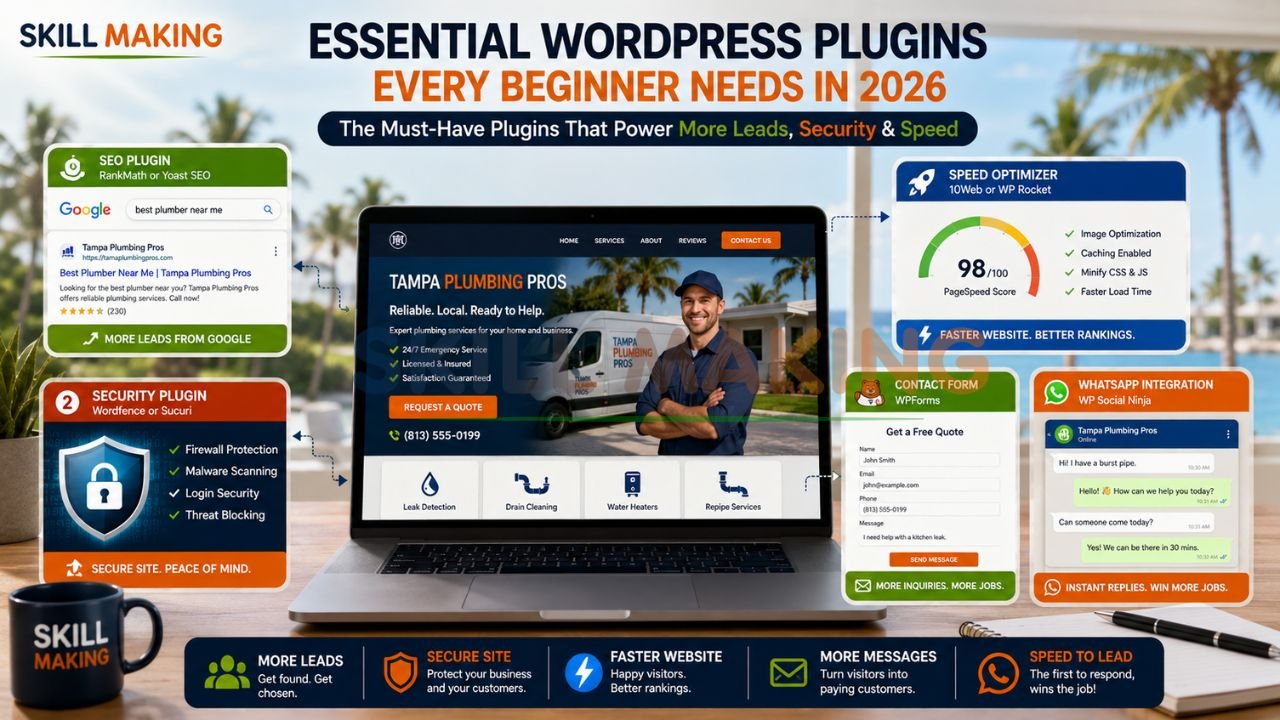
Don’t go overboard! Start with these “Must-Haves”:
👉 Get a Fast, Responsive WordPress Website with WhatsApp Integration & Smart SEO – 📲 Talk to Experts Now
- SEO Plugin (e.g., RankMath or Yoast): Helps you show up on Google when someone searches for “best plumber near me”.
- Security Plugin: Protects your “digital house” from uninvited guests (hackers).
- Speed Optimizer (e.g., 10Web or WP Rocket): Compresses your images and makes your site load lightning-fast.
- Contact Form (e.g., WPForms): Allows clients to send you messages directly.
- WhatsApp Integration: Essential for “Speed to Lead.” In the trades, the first person to call back usually wins the job!.
9. WordPress SEO Basics for Beginners
SEO (Search Engine Optimization) is just a way of making sure Google knows exactly what you do so it can recommend you to the right people.
- Define Intent: Don’t just write for keywords; write to solve the user’s specific problem (e.g., “emergency pipe repair”).
- Local SEO: If you are a contractor in Florida, target city-specific keywords like “luxury home builders in Miami”.
- Mobile-First: Over 70-80% of local searches now occur on mobile devices. If your site isn’t fast and responsive, you’re losing high-margin jobs.
- AEO (Answer Engine Optimization): In 2026, you want AI chatbots like ChatGPT to cite your business as a top recommendation.
10. Common Beginner Mistakes and How to Avoid Them
- Ignoring Updates: Arre bhai, skipping your weekly updates is like leaving your front door unlocked. Keep your themes and plugins updated to stay secure.
- Using Huge Images: Unoptimized photos are the #1 reason for slow sites. Always compress them before uploading.
- Buying Fake Reviews: Google is very smart in 2026. Stick to real customer feedback to avoid being shadow-banned.
- Ghosting Inquiries: If you don’t respond to a digital lead within 60 seconds, they’ve likely already called your competitor.
👉 Build a Professional WordPress Website for Your Construction or Small Business – 📲 Chat with Us Today
11. When Should You Switch from DIY WordPress to Professional Help?
Building a site yourself is a wonderful way to learn. However, there comes a point where your time is better spent on your craftsmanship than on “vibe coding” your layout.
Choose a Professional (Skill Making) If:
- You want a “hands-off” solution so you can focus on actual field work.
- You are targeting high-value contracts in competitive cities like Orlando or Tampa.
- You need a “lead-generation machine” that works 24/7 with hyper-local SEO dominance.
- You’ve hit the “Maintenance Trap” and feel overwhelmed by technical updates.
12. How Skill Making Helps Beginners and Small Businesses
At Skill Making, we don’t just build “pretty” websites; we engineer lead-generation machines tailored specifically for the trades. We understand the Florida market—from hurricane preparedness to local building codes.
Our clients see real results:
- 3.8x Average Growth in organic traffic within six months.
- 312% Increase in qualified lead requests.
- 74% Lead Conversion Rate driven by high-speed performance and trust signals.
Whether you need a starter site for a local plumbing business or a market-dominating portal for a large construction firm, we handle the digital “heavy lifting” so you can focus on your craftsmanship.
Explore our Professional Website Design Services to see how we can transform your business today.
Conclusion: Start Building Your Digital Future Today!
You’ve taken the first—and most important—step by learning the basics. WordPress is a powerful tool that can turn your skills into a thriving, 24/7 business. Remember, every “industry leader” started exactly where you are right now.
Don’t let your craftsmanship be hidden. Whether you are repairing roofs in Tampa or offering consulting services in Mumbai, your digital presence should reflect your professional excellence.
Ready to 10x your bookings without the technical stress? Stop guessing and start growing. Let the experts at Skill Making build a high-converting WordPress website that actually brings in jobs.
- WhatsApp Us Now: +91-7906334941
- Visit Us: skillmaking.com
- Our Service: Website Design for Contractors & Small Businesses
Trusted Resources for Your Journey:
- WordPress.org Official Beginner’s Guide
- Learn WordPress (Official Tutorials)
- WordPress Support Forums
- Google Search Central: SEO for Beginners
- Elementor AI Design Tools
