
Hey there! Have you ever clicked on a competitor’s website link, only to find a weird, half-finished page? Or maybe you’re eyeing a domain name for your own Florida business and want to know if someone is actively building on it, or if it’s just parked and forgotten. Knowing how to detect under construction websites is a surprisingly powerful skill.
👉 Don’t Let Your Business Website Stay “Under Construction” While Competitors Get the Leads – 📲 WhatsApp Us Today
It helps you keep tabs on local competition, protect your brand, and make smarter online decisions. In 2026, developers hide their “under construction” status in sneaky ways. But don’t worry! Picture quickly checking any site in just a few clicks, without needing a degree in computer science.
Whether you are a Florida contractor scoping out the competition or a business owner managing your own web presence, this guide is for you. Let’s dive into the easiest, most effective methods to figure out exactly what’s happening behind the scenes of any domain.
Why You Need to Know How to Check if a Website is Under Construction
You might be wondering, “Why does this even matter to me?” If you run a business, knowing how to investigate a website’s status gives you a massive competitive advantage.
First, it helps with competitor research. If a rival roofing or HVAC company suddenly takes their site down or puts up a maintenance page, they might be preparing for a massive rebrand. Catching this early lets you step up your own marketing game before they launch.
Second, it helps with domain purchasing. If you want a specific web address for your business but it leads to a blank page, you need to know if someone is actively building on it. If it’s abandoned, you might be able to buy it!
Finally, it helps you monitor your own web team. If you hired someone to build your site, these tools let you peek under the hood and verify that real progress is happening.
1. The Obvious Visual Clues (Front-End Detection)
Sometimes, the easiest way to detect an under construction website is simply by looking closely at the front page. Developers often leave behind visual breadcrumbs while they work.
👉 Let Skill Making Build a Fully Finished, High-Converting Website That Generates Real Customers – 📲 Start Chat Now
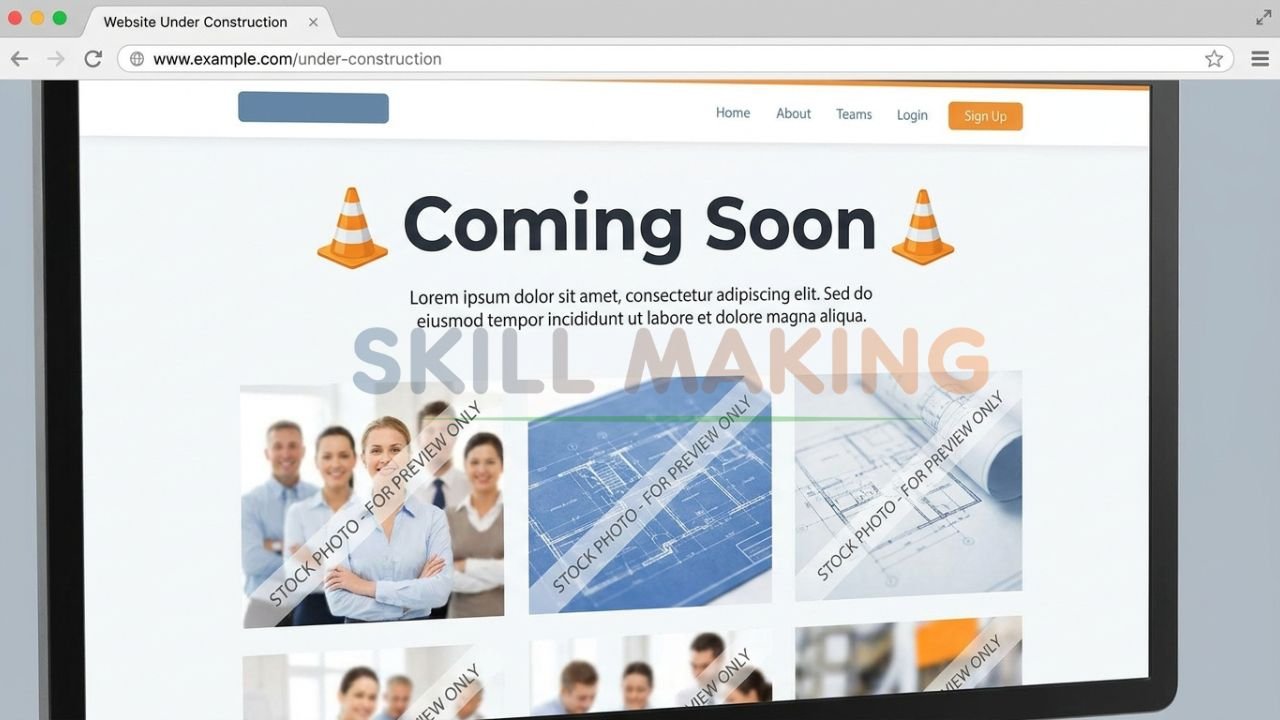
Spotting the “Coming Soon” or Maintenance Page
The most obvious sign is a literal “Coming Soon” or “Under Maintenance” landing page. Many website builders, like WordPress or Squarespace, have plugins that throw up a temporary splash page. If you see a countdown timer, a simple email capture form, or a generic “Pardon our dust” message, the site is definitely in the building phase.
Placeholder Text and Stock Imagery
What if the site looks somewhat normal, but feels… off? Look for “Lorem Ipsum” text. This is a Latin-looking dummy text that web designers use to fill space before the real copywriting is done.
If you see sentences like “Lorem ipsum dolor sit amet,” you’ve caught an unfinished site. Similarly, look for generic, unedited stock photos or images that still have watermarks on them.
Broken Links and Missing Menus
Try clicking around the navigation menu. On a website that is still being built, many menu items (like “About Us” or “Services”) won’t click through to anywhere. They might just refresh the home page or lead to a dead “404 Not Found” error. If the navigation doesn’t work smoothly, the site is still under construction.
2. Looking Under the Hood: Page Source and Meta Tags
If a website looks finished but you suspect it’s still being tested, you can easily look at the underlying code. You don’t need to be a coder to do this—your web browser has everything you need built right in.
👉 Need More Construction, Roofing, HVAC or Remodeling Leads? Get a Professional Website Today – 📲 Contact Us on WhatsApp
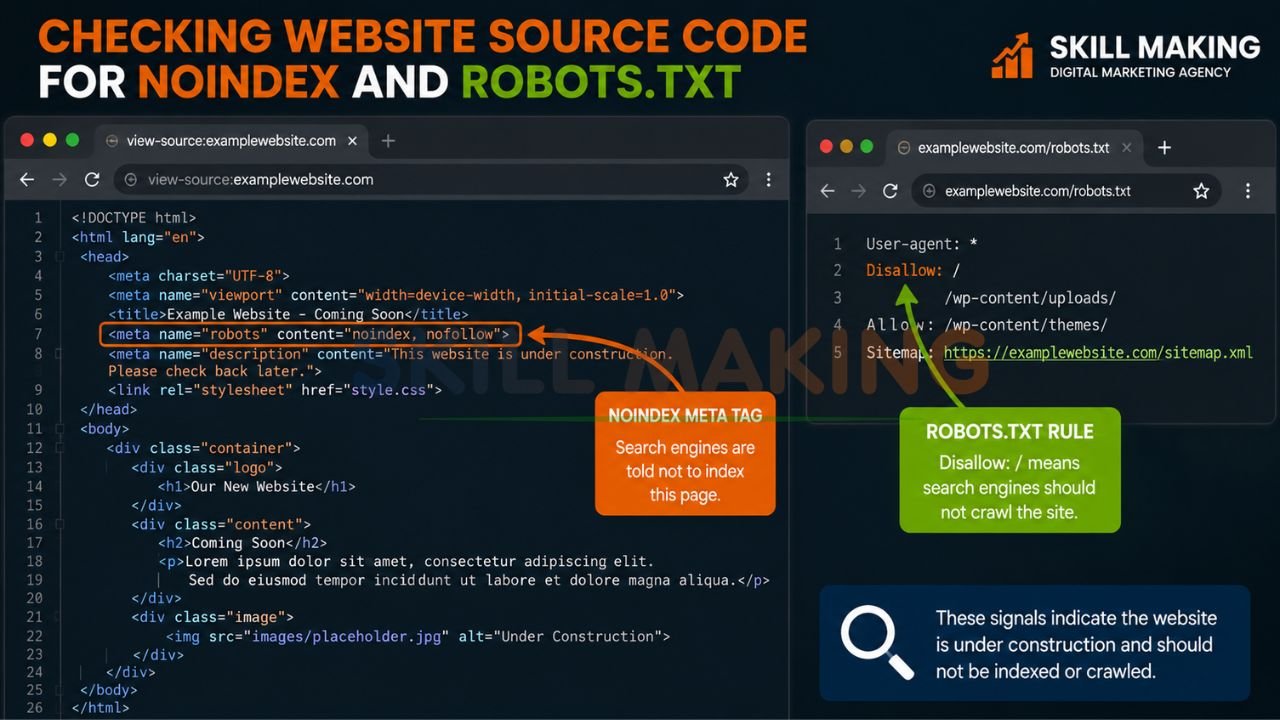
Spotting the “Noindex” Tag
When professionals build a website, they don’t want Google to show it to the public before it’s ready. To prevent this, they use a special line of code called a “noindex” tag.
Here is how you can check for it:
- Go to the website in question.
- Right-click anywhere on the blank background of the page.
- Click “View Page Source” (or press CTRL + U on Windows / CMD + Option + U on Mac).
- A new tab will open with a bunch of code. Press CTRL + F (or CMD + F) to open the search bar.
- Type the word noindex.
If you see <meta name=”robots” content=”noindex”>, it means the developer is actively telling Google to hide this site. This is a massive red flag that the site is still in the testing or construction phase.
Finding Default CMS Footers
Another quick source code check is looking at the very bottom of the website (the footer). Often, developers will use a Content Management System (CMS) like WordPress. If the site is unfinished, you might see default text at the bottom saying “Proudly powered by WordPress” or “Theme by [Developer Name].”
👉 Ready to Launch a Professional Website That Actually Brings Leads & Sales? Let Skill Making Help You Today – 📲 Contact Our Experts
3. The Robots.txt Trick: A Developer’s Best Kept Secret
Every legitimate website has a public file called robots.txt. This file acts as a set of rules for search engine bots (like Googlebot), telling them which pages they are allowed to scan and which ones they should ignore.
Checking this file is one of the fastest ways to detect under construction websites. Here is exactly how to do it:
- Open your web browser.
- Type in the website’s domain name, followed by /robots.txt. (Example: www.theirwebsite.com/robots.txt).
- Hit enter.
You will see a very plain white page with simple text. If the site is under construction, you will likely see this exact code:
User-agent: *
Disallow: /
In plain English, this translates to: “Hey all search engines, you are not allowed to look at any part of this website.” Developers use this rule exclusively when a site is still being built or undergoing heavy maintenance.
4. Analyzing HTTP Status Codes (The Technical Approach)
Whenever you type a web address into your browser, the website’s server sends a “status code” back to your computer. Most of the time, it sends a 200 OK code, which means the site is live and working perfectly.
But if a site is under construction, the server might send a different signal.
👉 Grow Your Business Faster with a Finished Website Designed to Bring More Calls & Projects – 📲 WhatsApp Our Team Now
The 503 Service Unavailable Code
A 503 Service Unavailable code is the standard internet signal for “we are under maintenance.” Web developers use this code to tell search engines that the downtime is temporary and they shouldn’t penalize the site’s SEO rankings.
How to Check HTTP Status Codes
You can’t normally see these codes on your screen, but it’s easy to check them using free online tools.
Simply go to a free tool like HTTPStatus.io and type in the domain name. If the result comes back as a 503, the site is currently being worked on. If it comes back as a 404 Not Found, the page doesn’t exist at all. If it says 401 Unauthorized, the site is likely locked behind a password for the developers to review.
5. WHOIS Lookups and Domain Age Analysis
Sometimes, a website is just a completely blank white screen. How do you know if it’s broken, abandoned, or secretly under construction? You use a WHOIS lookup.
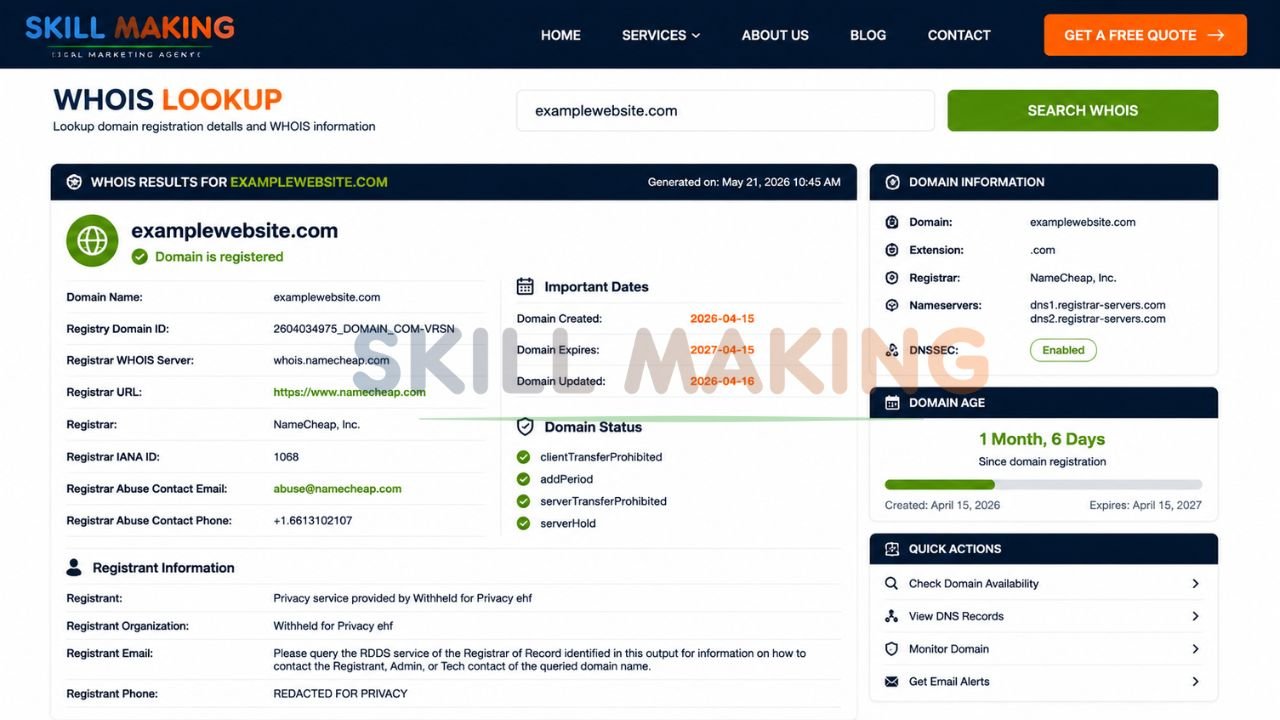
WHOIS is a public database that records exactly who owns a domain name, when it was registered, and when it was last updated.
👉 Let Our Experts Replace Your “Coming Soon” Page with a Professional Business Website That Converts – 📲 Start WhatsApp Chat
Here is your step-by-step method:
- Go to a free lookup tool like whois.icann.org.
- Type in the domain name you want to investigate.
- Look for the “Updated Date” and “Creation Date.”
If the domain was created five years ago but the “Updated Date” was just three days ago, it means someone is actively making changes to the server settings. They are likely building a new site right now! Conversely, if the site hasn’t been updated in three years and shows a blank page, it’s likely abandoned.
6. Using The Wayback Machine (Archive.org)
If you want to know what was happening on a domain before it went under construction, the Wayback Machine is your best friend.
Run by the Internet Archive, this tool takes historical screenshots of websites over time. Simply go to archive.org, enter the domain name, and look at the timeline.
You can click on dates from last month or last year. If you see that a fully functional plumbing website used to exist there, but today it just shows a blank page, you instantly know the business is in the middle of redesigning their site. It’s an amazing tool for checking the history of local competitors!
The High Cost of Staying “Under Construction” for Florida Contractors
Now that you know how to detect under construction websites, let’s talk about your own business. If you are a contractor in Florida, your website cannot afford to be stuck in “maintenance mode” or look like a half-finished template.
When a homeowner needs emergency repairs or a massive renovation, they want to hire a professional they can trust. If they click your link and see a broken page, “Lorem Ipsum” text, or a generic coming soon banner, they will immediately click away and call your competitor.
At Skill Making, we specialize in building fast, completed, hyper-local websites so you never have to worry about looking unprofessional.
👉 Get Website Design, Local SEO & Lead Generation Services Tailored for Florida Contractors – 📲 Chat with Us Today
Tailored Designs for Every Trade
Different trades need different website strategies to win jobs. A generic template simply won’t cut it.
- If you install and repair AC units in the sweltering Florida heat, you need a site that converts panicked homeowners instantly. We build the best HVAC website designs for Florida contractors, ensuring your emergency contact buttons are always front and center.
- Roofers need a website that builds massive trust and showcases warranties and drone footage. If your roofing site is stuck under construction, you are losing high-ticket jobs. Check out our specialized website design for roofing contractors to see how a finished site drives leads.
- Are you a general builder or remodeler? You need to show off your past projects beautifully. We provide premium construction website design services that win more jobs by turning your portfolio into a lead-generation machine.
- Landscapers thrive on visual transformations. A broken image link ruins your credibility. Our website design for landscaping contractors ensures your “before and after” galleries load perfectly on every mobile phone.
- Painters need sites that highlight detail and color accuracy. With our website design for painting contractors, your business will always look polished, professional, and ready to get to work.
Your digital storefront should be your best salesperson, operating 24/7. Don’t let an “under construction” label cost you thousands of dollars in missed contracts!
Conclusion: Ready to Check and Improve Your Own Website?
Learning how to detect under construction websites is an incredible tool to have in your digital marketing toolbelt. Whether you are hunting for visual clues like placeholder text, checking the robots.txt file, looking for noindex tags, or using historical tools like the Wayback Machine, you now have the power to see exactly what’s happening behind the scenes.
Use these tricks in 2026 to analyze your competitors, research new domain names, and ensure your own web developers are doing their jobs correctly.
But remember, knowing how to spot an unfinished website is only half the battle. Making sure your business website never falls into that trap is what actually makes you money. In the competitive Florida construction market, a half-finished website is as bad as a disconnected phone line. You need a fast, mobile-friendly, completed digital presence that proves you are the best in the business.
Ready to make sure your website is never stuck in ‘under construction’ mode? Call or WhatsApp Skill Making right now at 917906334941 or email us at info@skillmaking.com — we’d love to help you launch a finished, high-converting site!
Frequently Asked Questions (FAQs)
How long should a website stay under construction?
Ideally, a website should only show an “under construction” or maintenance page for a few days at most. If you are building a brand new site, build it on a private staging server first. Only push it live when it is 100% finished to avoid frustrating your visitors.
Can an under construction website rank on Google?
No, not really. If you have “noindex” tags or a robots.txt file blocking search engines, Google won’t rank the page. Even if it is not blocked, Google heavily penalizes pages with thin content, missing links, and dummy text.
Is a “Coming Soon” page better than a blank page?
Yes, absolutely! If you must be under construction, a “Coming Soon” page is much better than a broken error page. Make sure it includes your business name, a short description of what you do, your phone number, and an email capture form so you don’t lose potential leads.
