
If you’ve been browsing the internet for web design quotes, you’ve likely seen a massive range. Some agencies will tell you a “proper” site starts at $10,000, while ads on social media promise you a full business platform for $50. So, the question remains: How can I build a website under $1000 without it looking like a relic from 1998?
The honest answer is that in 2026, building a website on a budget is not only possible but more effective than ever. However, it requires setting realistic expectations. A $1000 budget means you are either investing your own time or finding a lean, specialized partner like Skill Making who knows how to cut the “agency bloat” and focus on what actually generates leads.
In this guide, we will break down every dollar, explore the best platforms, and show you exactly how to get a high-performing site that pays for itself in months, not years.
Is It Really Possible to Build a Good Website Under $1000 in 2026?
Yes, absolutely. But let’s define “good.” In 2026, a “good” website isn’t just about flashy animations; it is about mobile excellence, lightning-fast load speeds, and local SEO mastery.
The industry has shifted. Many of the “technical” tasks that used to cost thousands—like manual mobile optimization or complex server configurations—are now streamlined through better tools.
- The Trade-Off: If you spend $500, you are likely doing most of the work yourself.
- The Sweet Spot: If you spend $800–$1000, you can often hire a professional to handle the technical foundation, ensuring you don’t make mistakes that kill your search rankings.
👉 Want to Build a Professional Website Under $1000? 📞 Call/WhatsApp: +91 7906334941
Different Ways to Build a Website Under $1000
There is no “one-size-fits-all” approach. Depending on your technical skills and how much time you have, you can choose from several paths.
Option 1: DIY Website Builders (Wix, Squarespace)
DIY platforms are designed for beginners who want a “drag-and-drop” experience.
- Pros: Very easy to use; includes hosting and security out of the box.
- Cons: Monthly costs add up over time; limited “under-the-hood” SEO optimization.
- Estimated Annual Cost: $250–$500.
You can view current pricing on the Wix Pricing Page or Squarespace Pricing.
Option 2: Self-Hosted WordPress + Free/Premium Themes
WordPress powers over 40% of the web. It is the gold standard for flexibility and SEO.
- Pros: You own your data; expert-level Local SEO capabilities; massive library of plugins.
- Cons: Steep learning curve for beginners; you are responsible for updates and security.
- Estimated Initial Cost: $150–$600.
Check out the WordPress.org Hosting Guide for recommended providers.
Option 3: Hiring a Freelancer or Small Agency (The Skill Making Way)
This is the most balanced option for a business owner who is busy running their company. Agencies like Skill Making focus specifically on high-conversion sites for trades and service businesses, often delivering professional results within this budget range.
- Pros: Hands-off process; built for lead generation; expert local SEO for your specific city.
- Cons: Higher initial investment than DIY.
- Estimated Cost: $700–$1,000 (for starter business sites).
Option 4: Using AI Website Builders
In 2026, AI builders can generate a site layout in minutes.
- Pros: Extremely fast; very low cost.
- Cons: Often produces generic designs; SEO performance can be hit-or-miss without manual intervention.
- Estimated Cost: $0–$300.
Detailed Cost Breakdown: What You Can Get for Under $1000
When you are asking yourself, “How can I build a website under $1000?”, you need to see where every penny goes. Here is a realistic breakdown for 2026.
| Expense Category | Low-End DIY (Self-Managed) | Mid-Range Professional (Skill Making) |
|---|---|---|
| Domain Registration | $15 – $20 | $15 – $20 |
| Hosting (Annual) | $50 – $150 | Included in setup or ~$150 |
| Theme / Design | $0 – $60 (Free or Premium) | Included in Professional Quote |
| Content & Copy | DIY ($0) | Professional Optimization Included |
| SEO Setup | DIY ($0) | Included (Local SEO Focus) |
| Security (SSL) | Included (usually) | Included |
| Total Estimated | $65 – $230 | $700 – $1,000 |
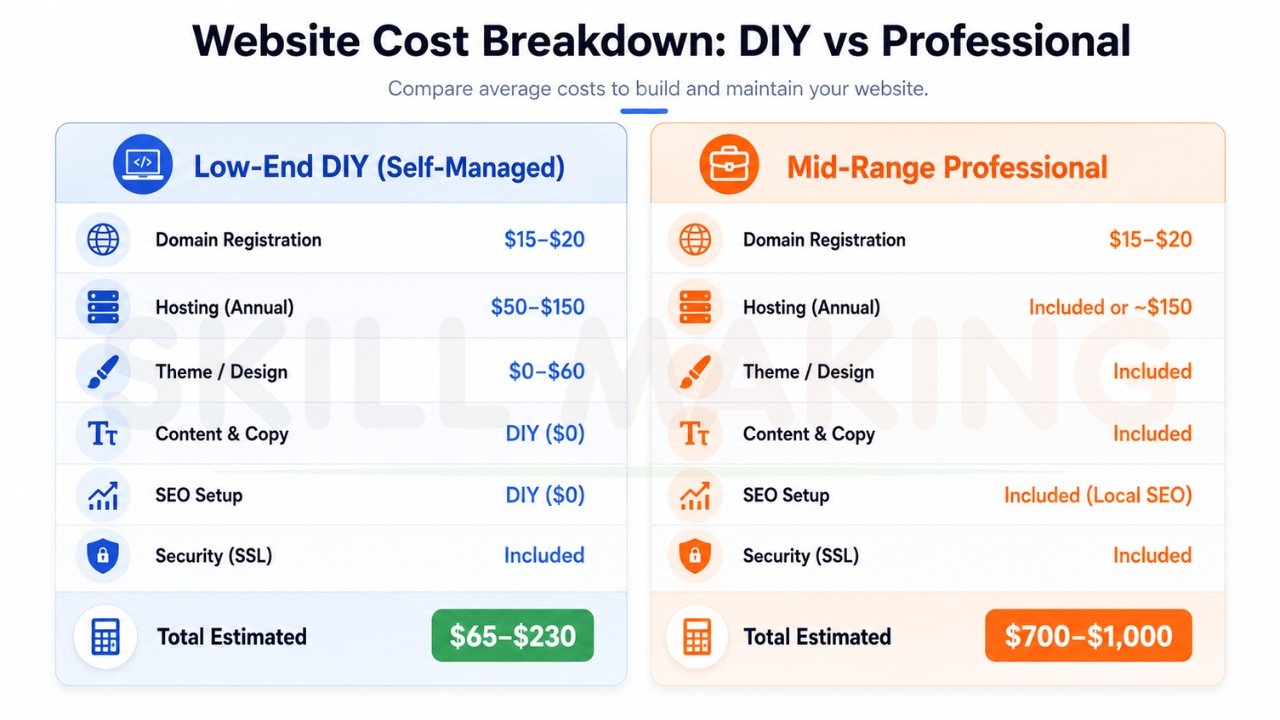
Note: While DIY looks cheaper, the “hidden cost” is your time. For a business owner, spending 40 hours building a site is 40 hours you aren’t earning money.
👉 Get an Affordable, High-Converting Website Designed for Your Business – 📲 Chat Now: +91 7906334941
Must-Have Features Even on a $1000 Budget
Just because you are on a budget doesn’t mean you should compromise on quality. Every business site in 2026 must have:
- Mobile-First Design: Over 70% of local searches happen on phones. If it doesn’t work on a phone, it’s broken.
- Click-to-Call Buttons: For services like plumbers or electricians, the phone number must be sticky at the top of the screen.
- Fast Loading Speeds: Your site must load in under 3 seconds, or users will bounce to your competitor.
- Local SEO Mastery: You must target city-specific keywords (e.g., “Best contractor in Tampa”) to appear in the Google Map Pack.
- WhatsApp Integration: Give customers a frictionless way to reach you instantly.
Hidden Costs to Watch Out For
Don’t let these “gotchas” blow your $1000 budget:
- Stock Photos: Professional images can cost $10–$50 each. Try using high-quality photos of your actual work instead—it builds more trust.
- Premium Plugins: Some “essential” WordPress tools have annual subscriptions of $50–$200.
- Maintenance: Who fixes the site if it breaks? DIY builders include this, but for WordPress, you may need a small monthly maintenance fee.
- Content Creation: Writing SEO-optimized text is a skill. If you aren’t a writer, this is the first thing you should budget for.
How Skill Making Helps Build Professional Websites Within Budget
At Skill Making, we don’t just build “pretty” websites; we build lead-generation machines specifically for the trades. We understand that as a small business owner, you need a site that makes your phone ring, not one that just sits idle.
We have streamlined our process to remove the “bloat” of traditional agencies. By focusing on what matters—like hyper-local SEO and call-optimization—we can deliver high-performing websites at a fraction of the cost of general marketing firms.
👉 Need a Fast, SEO-Friendly & Mobile-Responsive Website Under Budget? 📲 Call Today: +91 7906334941
Our 5-Step High-Conversion Process:
- Market Analysis: Identifying the “missing circuits” in your current strategy.
- Frictionless UI/UX: Designing so users are never more than one click from calling you.
- Technical Development: Using lightning-fast frameworks for instant loading.
- Conversion Setup: Integrating WhatsApp and lead forms.
- Performance Monitoring: Ensuring your site stays compliant with modern algorithms.
Explore our Professional Website Design Services to see how we’ve helped businesses grow their organic traffic by an average of 3.8 times within six months.
Step-by-Step Action Plan to Build Your Website Under $1000
Follow this 30-day plan to move from “Invisible” to “Industry Leader”.
Week 1: Strategy & Setup
- Pick a Domain: Keep it short and relevant.
- Choose Your Path: Decide if you are going DIY or hiring a budget-expert like Skill Making.
- Gather Assets: Collect your best project photos and certifications.
Week 2: Content & Structure
- Map Your Site: (Home, Services, About, Contact).
- Draft Your Copy: Focus on the benefits you provide to your local customers.
Week 3: Design & Lead Tools
- Build for Mobile: Ensure the mobile interface is flawless.
- Add CTA’s: Place “Get a Free Quote” buttons prominently.
Week 4: Test & Launch
- Check Speed: Use tools like Google PageSpeed Insights.
- Go Live: Connect your site to your Google Business Profile.
Common Mistakes to Avoid When Building on a Budget
Avoid these pitfalls that deter 70% of potential visitors:
- Using Generic Design: Templates that look like every other contractor dilute your brand.
- Ignoring SEO: A “pretty” site that nobody can find is useless.
- Ghosting Inquiries: If you don’t respond to a lead within the “Golden Minute,” they will call your competitor.
- No Performance Tracking: If you don’t use Google Analytics, you won’t know which pages are actually making you money.
Conclusion: Take the Next Step Toward Growth
In 2026, your website is your most valuable asset. It is the bridge between your craftsmanship and a $2 trillion market. Whether you are a general contractor, a plumber, or a freelancer, a professional, fast, and SEO-optimized website is what will set you apart from the competition.
So, how can I build a website under $1000? You can do it by being smart, choosing the right tools, and focusing on conversion over “fluff.”
If you want the peace of mind that comes with professional design, let us handle the heavy lifting. At Skill Making, we specialize in building high-quality websites for small businesses that fit your budget and actually ring your phone.
Ready to grow your business?
- Visit Us: https://skillmaking.com/website-design/
- WhatsApp Us Now: +91-7906334941
Let’s build your 24/7 sales machine today.
