
The digital landscape has shifted toward an AI-first reality where nearly 80% of all web development workflows now incorporate some form of generative automation. In 2026, building a website is no longer just about technical code; it is about leveraging the free AI tools for web development to accelerate your time-to-market while maintaining professional standards.
For small business owners and beginner developers, the barrier to entry has never been lower. Advanced models like GPT-5.5 and Claude 4.0 have turned “website building” from a months-long ordeal into a process that can initiate in under seven minutes. However, the gap between a “generated” site and a “high-converting lead machine” remains significant. This guide explores the best free AI resources available today to help you bridge that gap without breaking the bank.
Why Free AI Tools Are a Game-Changer for Web Development?
In previous years, web development required significant upfront investment in software and specialized talent. In 2026, free AI for web developers has democratized the ability to create complex digital structures.
- Eliminating the “Blank Canvas” Syndrome: AI can generate production-ready layouts from simple natural language prompts.
- Cost Efficiency: Leveraging free tiers can save small firms between ₹50K to ₹2L in early-stage development fees.
- AEO and SEO Alignment: Modern AI tools automatically structure content to be cited by AI search assistants, ensuring your business is found where customers are looking.
- Vibe Coding: You can now describe layout changes via chat, and the AI executes them instantly.
👉 Want to Create Professional Websites Using Free AI Tools? 📞 WhatsApp Today: +91 7906334941
Top 12 Best Free AI Tools for Web Development in 2026
1. ChatGPT (OpenAI)
ChatGPT remains the most versatile general-purpose ChatGPT for web development tool. With its advanced reasoning, it can act as a 24/7 developer for writing custom CSS or PHP snippets.
- Best For: Logic puzzles, content generation, and custom code snippets.
- Free Tier: Generous access to standard models with periodic access to flagship capabilities.
2. Claude (Anthropic)
Many developers consider Claude for coding superior due to its nuance and safety guardrails. It excels at understanding complex project structures and providing human-like explanations for technical issues.
- Best For: Technical documentation and debugging complex codebases.
- Free Tier: Limited daily messages but highly accurate.
3. Google Gemini
Gemini is deeply integrated with the Google ecosystem, making it excellent for research-based development and integrating Maps or Calendar APIs.
- Best For: API integration and multi-modal project planning.
- Free Tier: Wide availability across Google Workspace products.
4. GitHub Copilot (Free Individual Tier)
As an AI-powered developer platform, GitHub Copilot assists in writing, testing, and fixing code in real-time. The 2026 free individual tier has made professional-grade autocomplete accessible to everyone.
- Best For: Accelerating coding speed within an Integrated Development Environment (IDE).
- Free Tier: Now includes “Autofix” capabilities for individual developers.
5. v0.dev (Vercel)
V0.dev allows you to build applications and websites through natural language prompting. It focuses on “agentic” development, where the AI plans tasks and connects to databases automatically.
- Best For: Rapid UI prototyping and React-based components.
- Free Tier: Credits for generation that replenish monthly.
6. Cursor (AI Editor)
Cursor is a fork of VS Code that has AI baked into its core. It understands your entire codebase, allowing for “whole-project” awareness when asking questions or generating new features.
- Best For: Deep, context-aware coding.
- Free Tier: Basic AI features and limited high-end model requests.
7. Replit Agent
Replit has evolved into a cloud-based environment where an AI agent can build, deploy, and host your application in a few clicks. It is perfect for those who want a “zero-setup” experience.
- Best For: Rapid prototyping and instant deployment.
- Free Tier: Community workspace with basic hosting capabilities.
8. Blackbox AI
Specifically designed for code search and autocomplete, Blackbox AI can turn any video or image into code, making it a favorite for frontend developers copying designs.
- Best For: Converting visual designs into working code.
- Free Tier: Daily limit on code generations.
9. 10Web (Free Plan)
For those focusing on free AI tools for WordPress development, 10Web offers an agentic builder that can convert Figma designs directly into WordPress pages.
- Best For: Automating WordPress site generation and speed optimization.
- Free Tier: Allows for site generation and staging without initial hosting costs.
10. Elementor AI (Free Features)
Elementor’s AI Site Planner generates sitemaps and wireframes instantly, providing a visual drag-and-drop workflow that is ideal for non-coders.
- Best For: Visual creators and complex design needs within WordPress.
- Free Tier: Basic layout generation and image editing.
11. Framer AI
Framer excels at creating high-fidelity animations and visual layouts from simple text prompts. It is one of the best free AI for web developers focusing on aesthetic-heavy sites.
- Best For: Creative and visual design with high-fidelity animations.
- Free Tier: Publish to a Framer domain with basic features.
12. Wix ADI 2.0
Wix has refined its Artificial Design Intelligence (ADI) to be conversational, allowing users to “edit” their site by simply talking to it.
- Best For: Sole proprietors and simple service-based sites.
- Free Tier: Ad-supported site on a Wix subdomain.
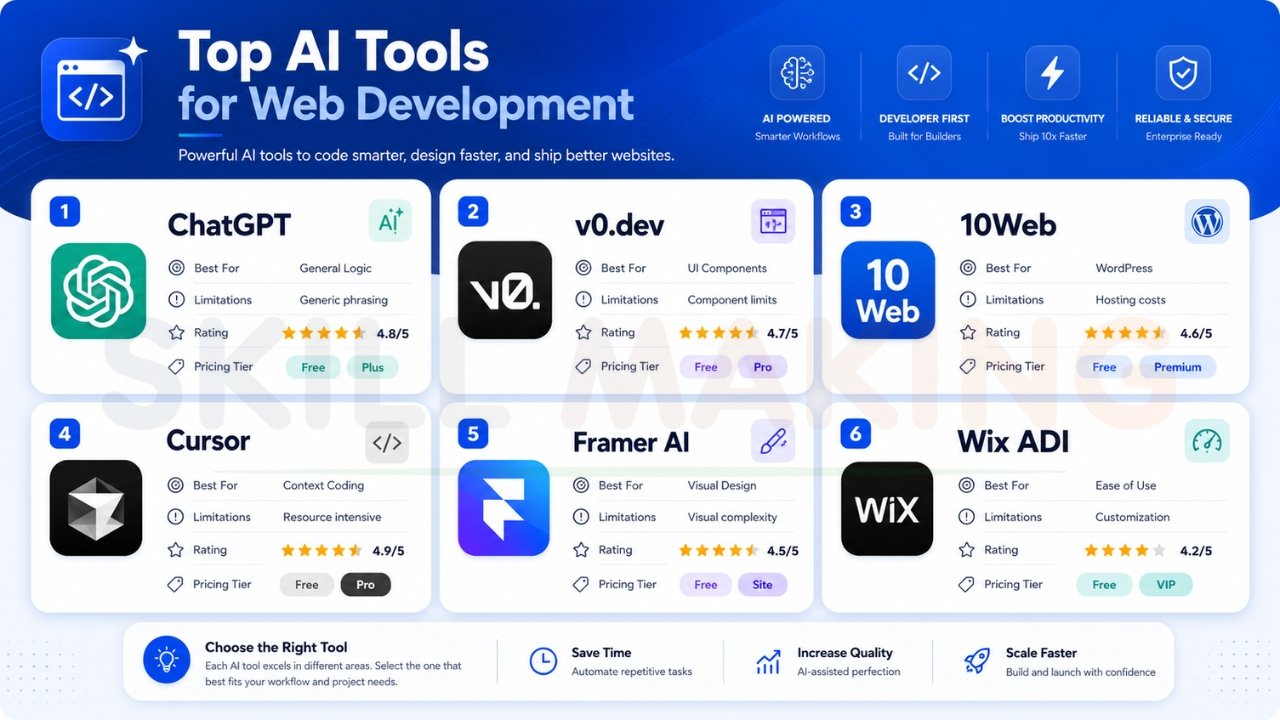
Head-to-Head Comparison: Free AI Web Development Tools 2026
| Tool | Best For | Limitations | Rating | Pricing Tier |
|---|---|---|---|---|
| ChatGPT | General Logic | Generic phrasing | 4.8/5 | Free / Plus |
| v0.dev | UI Components | Component limits | 4.7/5 | Free / Pro |
| 10Web | WordPress | Hosting costs | 4.6/5 | Free / Premium |
| Cursor | Context Coding | Resource intensive | 4.9/5 | Free / Pro |
| Framer AI | Visual Design | Visual complexity | 4.5/5 | Free / Site |
| Wix ADI | Ease of Use | Customization | 4.2/5 | Free / VIP |
Get a professional website built with expert developers at Skillmaking to ensure your AI-generated foundation is polished into a market-leading asset.
How to Use Free AI Tools for Different Web Development Tasks?
Using free AI website builders and assistants effectively requires a strategic approach.
Frontend Development
Use v0.dev or Framer AI to generate your initial layouts. Provide a “Smart Prompt” like: “Create a mobile-first hero section for a construction firm in Orlando. Include a ‘Get a Quote’ button and a high-resolution gallery slider.”.
Backend and Logic
Leverage ChatGPT or Claude to write your server-side logic. You can ask for custom PHP snippets for unique features like a “Repair Cost Estimator” or a “WhatsApp Shortcode” that only appears during emergency hours.
WordPress Specifics
Use 10Web to generate your theme and Elementor AI to refine the visual elements. Ensure you add “LocalBusiness” schema and geocoding to build immediate social proof for search engines.
UX/UI Design
Consult the Nielsen Norman Group for research-based UX guidance and use AI to implement their best practices, such as optimizing for session timeouts and accessibility.
Special Tips for Construction Companies & Home Improvement Businesses
In the Florida construction market, generic marketing is a major error. You must highlight niche specializations.
- Hurricane Preparedness: Market yourself as the “Storm Ready” contractor. Use AI to quickly generate landing pages for surge protection or storm-hardening windows starting in April.
- Visual Storytelling: While AI can enhance your galleries, ensure they showcase real local work. Stock photos of snowy mountains will ruin your credibility in cities like Orlando or Miami.
- Speed to Lead: Use AI to set up automated “We’re on our way!” WhatsApp messages. In the trades, the first person to call back usually wins.
For more strategies, read our guide on what marketing is in the construction industry.

👉 Build High-Converting Websites with Free AI Tools & Expert Guidance – 📞 Call Today: +91 7906334941
Limitations of Free AI Tools (and When to Hire Professionals)
While AI is transformative, it is not a magic bullet. Understanding these trade-offs is vital for long-term success.
- The “Template Trap”: Free AI generators can produce generic designs that look exactly like your competitors.
- SEO Limitations: AI often lacks the “hyper-local” strategy needed to rank for specific neighborhood keywords like “Luxury Residential in Miami”.
- Security Risks: DIY platforms often use standard security. Professional firms like Skillmaking provide advanced SSL and Florida-compliant privacy protections.
- Brand Personality: AI struggles to capture the unique “About Us” story and safety record that builds deep trust with high-value clients.
Skip the limitations of free AI tools — let Skillmaking build your site and turn your digital presence into a 24/7 sales representative.
Common Mistakes When Using Free AI Tools for Web Development
Avoid these pitfalls that can silence your phone and waste your budget:
- Ignoring Search Intent: Don’t just write for keywords; write to solve the user’s specific problem.
- Ghosting Inquiries: If you don’t respond to a digital lead within 60 seconds, they have likely called your competitor.
- Generic Content: Avoid “AI giveaway” words. Always run a final human edit to ensure your “Technical Authority” is clear.
- Buying Fake Reviews: Google will catch this and shadow-ban your business. Stick to real customer feedback.
For more details, check out how to avoid common marketing mistakes construction companies often make.
How to Combine Free AI Tools with Professional Design for Best Results?
An AI-generated site is often a 70% solution. To reach 100%, you must customize for performance.
- Speed Optimization: If your site takes more than 2 seconds to load, you lose 70% of your visitors.
- Sticky Navigation: Key buttons like “Call Now” should always be visible on mobile.
- Frictionless Contact: Integrate WhatsApp buttons and optimized bid forms to reduce user friction.
Let Skillmaking build a custom WordPress site with AI + expert design to ensure your technical foundation is flawless.
How Skillmaking Uses Free + Premium AI Tools + Human Expertise?
At Skillmaking, we don’t just “use” AI; we engineer it to serve the trades. Our approach delivers measurable results that DIY tools simply cannot match:
- 3.8x Average Growth in organic traffic within six months.
- 312% Increase in qualified lead requests for specialized trades.
- 74% Lead Conversion Rate driven by optimized trust signals and high-speed performance.
We handle the digital “heavy lifting”—from Google Business Profile optimization to technical AEO—so you can focus on your craftsmanship.
Frequently Asked Questions (FAQ)
- Can free AI build a fully functional website?
Yes, tools like 10Web and v0.dev can generate complete sites with themes and plugins in minutes, though they often require professional polishing for maximum conversion. - Is AI-generated content bad for SEO?
Not if it’s high-quality and human-edited. In 2026, content must be optimized for Answer Engine Optimization (AEO) to appear in chatbot answers. - What is the best free AI for web developers starting out?
ChatGPT and Cursor are excellent for logic and code structure, while v0.dev is best for visual component generation. - How fast should my website be in 2026?
Aim for under 2 seconds. Anything over 3 seconds results in massive traffic loss for mobile users. - Does ChatGPT know how to code in WordPress?
Yes, it can write custom PHP and CSS snippets for WordPress themes and plugins. - Is GitHub Copilot truly free?
GitHub offers a free tier for individuals with basic features, though enterprise-grade security and advanced “Autofix” may require a subscription. - Can I use AI to get more home improvement leads?
Absolutely. AI can help you identify high-intent keywords and create landing pages for seasonal niches like hurricane restoration. Learn how to get more home improvement leads here. - What is “Vibe Coding”?
A feature by 10Web and similar tools that allows you to describe design ideas via chat to receive custom layouts instantly. - Why should I hire Skillmaking instead of doing it myself with AI?
While AI handles speed, Skillmaking provides the hyper-local SEO, security, and conversion-focused design that turns a generic template into a high-growth asset. - What high-authority resources should I follow for web dev trends?
Stay updated through Smashing Magazine for development insights and GitHub for open-source innovation.
Conclusion: Start Winning the 2026 Market Today
The Florida market in 2026 is full of opportunities for those who are willing to invest in their digital presence. Whether you are a plumber, electrician, or general contractor, your craftsmanship deserves to be seen. While free AI tools for web development provide a powerful starting point, long-term success requires a strategic, automated approach that converts clicks into contracts.
Don’t let your competitors take the best jobs in your ZIP code simply because their website was easier to find.
Ready to scale your business?
Contact Skillmaking today to build a custom lead-generation system that combines the speed of AI with the expertise of master developers.
- WhatsApp Us Now: +91-7906334941
- Visit Us: https://skillmaking.com
- Specialized Service: Professional Website Design for Contractors
